

Guests & Guest Portal
Questi contenuti non sono ancora disponibili nella tua lingua.
| Why | Keep guest data in order and give the guest access to their booking without a password or calls to the hotel. |
| Who | Administrators and front desk staff who manage guests and answer their questions. |
Every booking has two sides: the hotel team works with the guest on the guest profile, while the guest sees their own booking through the Guest Portal. This article covers what guest profiles store, how the guest gets into the portal, and what they can do there on their own.
Guest profiles
Section titled “Guest profiles”The Guests section stores profiles: contact details, stay history, team notes, and files. The history shows when and in which bookings the guest stayed; notes keep arrangements and preferences that must survive between stays; files are the documents attached to the guest.
Duplicates are found automatically: matches are searched by passport, email, and phone. Found duplicates merge into one profile — the guest’s stay history does not split across several profiles.
What the Guest Portal is
Section titled “What the Guest Portal is”The Guest Portal is a personal page of the booking that opens without a password and without installing an app. The guest follows a personal link from an email and confirms the sign-in with a code: the code works for 60 minutes with 5 attempts to enter it; after signing in, the session stays alive for 30 days.
In the portal the guest sees the whole booking: rooms and guests, prices by day, ordered services, taxes, and the balance due.
Sending the link to the guest
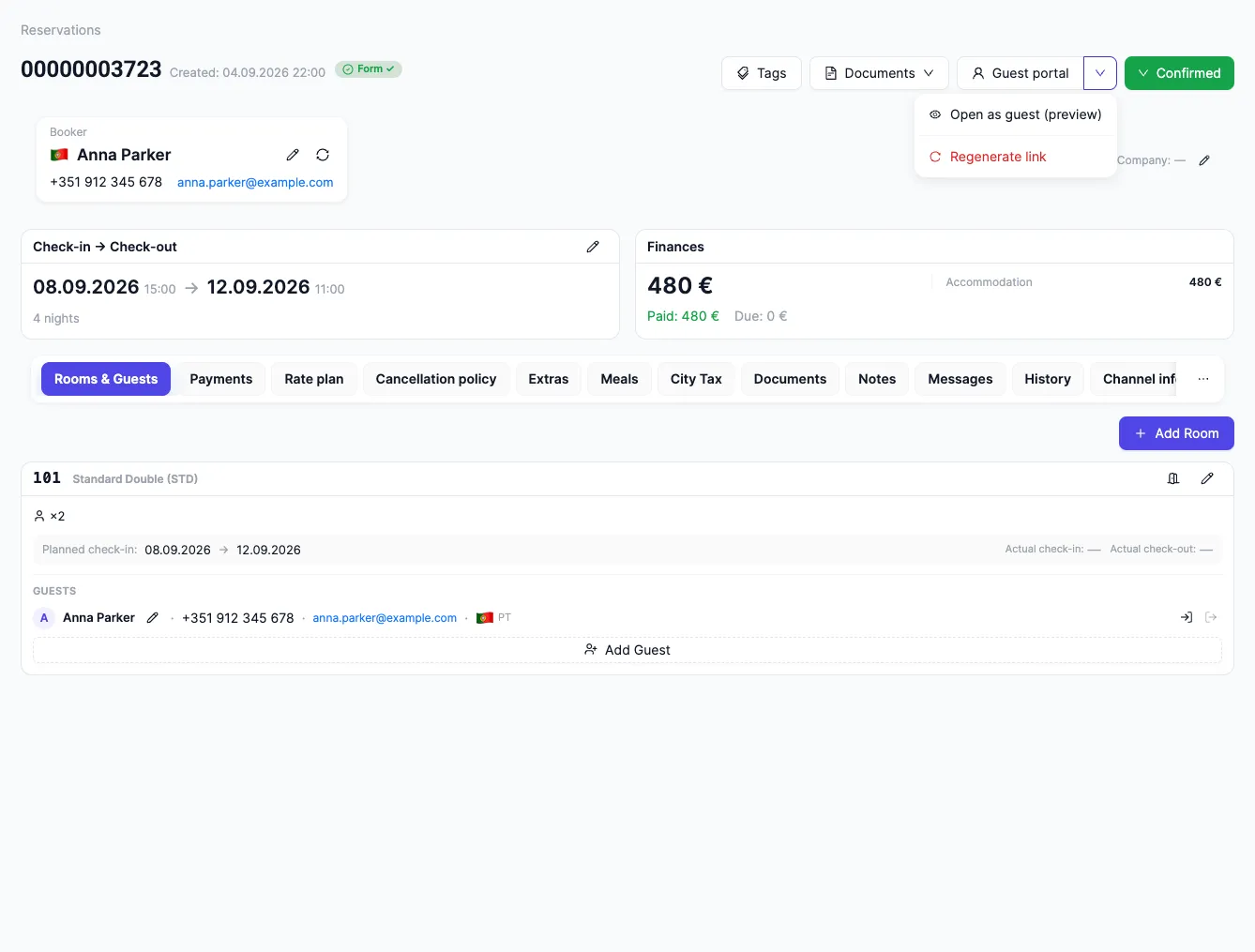
Section titled “Sending the link to the guest”The personal link lives on the booking card. The Guest Portal button opens a menu of actions: “Open as guest (preview)” shows the portal through the guest’s eyes — exactly what the guest will see on their link; the preview is for looking only, it does not change the booking.
This is also where the link is reissued: “Regenerate link” revokes the previous one — the old link and any active sessions on it stop working, and a new email goes to the guest on its own. Reissuing saves the day when the link is lost or went to the wrong place: nothing needs to be forwarded by hand.
What the guest can do themselves
Section titled “What the guest can do themselves”- Add companions. The guest enters the people traveling with them — details are collected for each guest separately.
- Upload documents. The guest’s files land on the guest profile and are visible to the hotel team. Passport data is protected: it is encrypted at the application level.
- Order a service from the hotel’s catalog — including a specific time slot: free slots are checked when ordering.
- Ask the hotel a question. A question from the portal lands in the hotel’s common message queue — from there the format is “question → answer”: the hotel replies, and the answer goes to the guest (the full path is in Guest questions: from the portal to the hotel’s Inbox).
Honest limits
Section titled “Honest limits”- The booking cannot be paid in the portal. The guest sees the balance due, but the payment itself does not happen in the portal — it goes through the booking site, under the rate plan’s rules.
- There is no chat in the portal. The format is “question → answer”: the guest’s question lands in the hotel’s common message queue, with no real-time conversation.
- The online registration card is filled in by the guest (the form lives on the guest profile); companions and documents the guest adds on their own too — see Prepare guests for arrival.
See also
Section titled “See also”- Booking Engine — the booking module on the hotel’s website: this is where the guest picks a room and pays for the booking.
- Guest Portal: FAQ — short answers about sign-in, payment, check-in, and data security.
- Guest profiles: history, notes, files, duplicates — how to keep guest profiles in order: what a profile stores, how duplicates are found and merged into one profile.
- Prepare guests for arrival: companions and documents — what the guest fills in before arriving: companions, documents, and the online registration card.
- Guest service orders: catalog and time slots — how the guest orders services from the hotel’s catalog, including a specific time slot.
- Guest questions: from the portal to the hotel’s Inbox — the path of a question: how the guest asks it in the portal and where the hotel replies.
- The guest’s personal link: preview and reissue — where the link lives, what the preview shows, and what happens when the link is reissued.
- How guest data is protected — what data is collected, how it is encrypted, who sees it, and where it lives.