Notes for hoteliers
The software a small hotel needs: PMS, Booking Engine, Channel Manager and reports
Iram Shehzad / Pexels
Eight check-ins on one Friday. A spreadsheet, an inbox and a paper notebook at the front desk — this is usually the moment the owner of a 12-room hotel starts shopping for software. Until then, everything worked by hand: a booking lands in email — you write it down; a guest calls — you move it; the guest arrives — you check them in.
From here, two paths. One: buy the “hotel program” someone recommended in a chat. Two: type the query into a search engine and drown in “top 20” listicles, where every vendor calls its own system essential. Both paths end the same way: something unnecessary gets bought, and something necessary stays missing.
The real list is shorter. A small hotel needs one core — a PMS (property management system) — and three modules around it: a Booking Engine, a Channel Manager and a Guest Portal. Reports aren’t a separate purchase: they grow out of the same PMS. Everything else — a revenue management system, a restaurant POS, smart locks — waits for an actual reason.
Let’s walk through it in order: what each system does, what you can live without, and what to connect first.
The map: one core, four modules around it
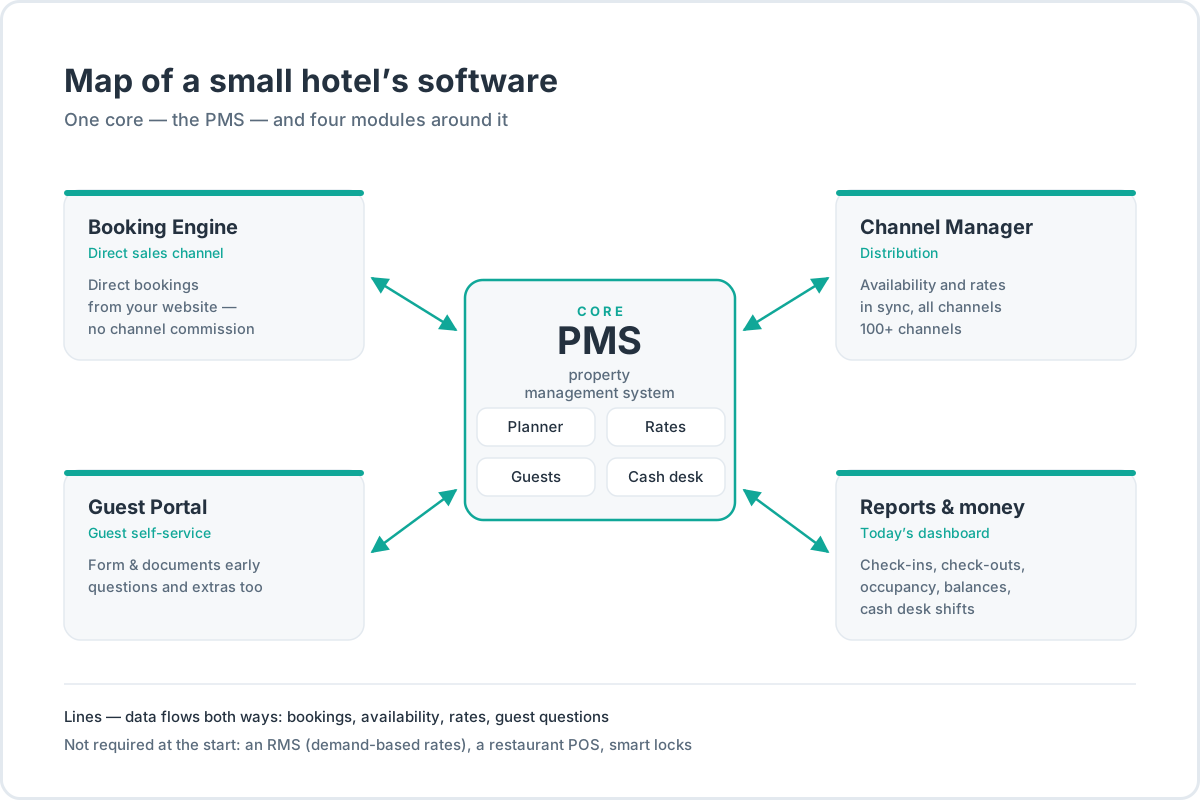
The short version, for keeping in your head:
| System | What it covers | What happens without it |
|---|---|---|
| PMS | bookings, Planner, rates, guests, cash desk | every list has a life of its own |
| Booking Engine | direct bookings from your website | channel commission on every booking |
| Channel Manager | availability and rates across all channels | manual copying and double bookings |
| Guest Portal | registration form, documents, questions, extras | calls, emails and paper forms |
| Reports | today at a glance — and the money | decisions from memory |
Then — one system at a time.
PMS: the core you start with
A PMS is where bookings, rates, rooms, guests and money live. Inside it: the Planner, where bookings from every source converge; rates with cancellation rules and sales restrictions; guest profiles with history; the cash desk with shifts. Prices live in rates, bookings live in the Planner — and if those two things aren’t kept apart, sooner or later a Friday price gets changed by accident.
Before a single system exists, each of these has a home of its own: bookings in email and a spreadsheet, room statuses in a messenger, money in a bank statement. It works. Right up until the day two people are looking at two different versions of the same evening.
In a Hotel Tech Report survey (450 hoteliers, 2026), 86% call the PMS the most important system in the hotel, and 91% say it directly drives revenue. These are vendor-side numbers — Hotel Tech Report sells software rankings — but the order of magnitude holds: everything else gets built around the PMS, not the other way around. The same survey: 89% of operators save 2–10+ hours a week, and 17% save more than 500 hours a year.
What does this mean in practice at a 12-room property? Friday morning, one screen: the arrivals queue, every booking with its guest, room and payment. Check-in in a click or two, a booking moved by dragging, the price for a date changed in the rate. Daily alerts nudge you about an unpaid arrival and a room that isn’t ready.
Cloud or desktop is a separate question. In 2025, about 65% of the PMS market was cloud (Mordor Intelligence; researchers disagree several-fold on absolute market size, so trust the share, not the sum). For a 9–30 room property it means one simple thing: no server, no installation — work from the browser, at the desk, from home, from a phone. More about the core — on the PMS page.
The last thing to understand about the core: there should be exactly one. Two systems, each with its own Planner, is not redundancy — it’s two versions of the truth. If someone is pitching you “a system for channels” plus, separately, “a system for the desk,” ask where their data meets. In a good small-property PMS it all meets in one window: bookings from any source in the Planner, prices in rates — and if you need a “prices by date” view, it’s shown right in the grid cells.
Think about the people in advance, too. A 12-room property usually has two or three people with different access: the owner looks at the money, the receptionist works bookings and check-ins, the housekeeper needs only the day’s room list. Roles and permissions are a boring subject — right up to the first time a guest calls and it turns out the needed fix can only be made by “the one who knows how,” and he’s on vacation.
Booking Engine: your website as a sales channel
A Booking Engine is the selling form on your website. The guest picks dates and a room type, sees your rates, pays by card — and the booking drops into the Planner by itself, no email thread, no manual copying. It only works paired with a PMS: the engine shows real availability and real prices, not a picture from last month.
Why this is money, not “one more feature.” Per an industry report (135 million bookings a year, 20 countries), a booking from a hotel’s own site brings in $516 on average; a booking from a channel, $312. The direct channel makes the top 3 by revenue on 90% of markets. Why exactly is a question for a separate study — but a two-thirds gap is reason enough to set up a sales channel of your own.
The channel commission doesn’t disappear, of course: by industry vendors’ estimates, it runs 15–30%+ per booking. No methodology is published behind these figures, so the honest phrasing is: a channel commission is a noticeable, permanent percentage of revenue that you pay on every booking that didn’t come from your own site. What a channel costs and where the commission comes from — in the OTA (online travel agency) deep dive.
And the caveat cuts both ways: a direct channel isn’t free. Payment processing, the website, traffic — by the same vendor estimates, another 4–5% in costs. The engine doesn’t replace channels; it adds one where you pay no commission for bringing you the guest. Details — on the Booking Engine page.
What to look for when choosing one. The widget should drop into your existing site — literally a couple of lines of code, no rebuild; guest-facing pages in several languages, if your guests travel from abroad; payment by card, with prepayment or a deposit hold to choose from. The small things that quickly become mandatory: promo codes, selling extras with a time slot (a transfer timed to a specific flight), booking two or three rooms in one go for a family. All of it should be part of the module, not “the next pricing tier up.” How the storefront looks to the guest and which rate plans to put on it — in the Booking Engine guide.
Channel Manager: so the channels don’t lie
Channels are still where the demand lives. In an industry report covering 90+ million bookings at independent properties in 2025, channels took 63.4% of bookings and direct channels 36.6%. A year earlier, the channel share was 61%. The trend doesn’t favor direct sales, and there’s no point arguing with it: channels bring guests the property can’t reach on its own.
The problem isn’t channels — it’s how many of them there are. Three channels means three tabs, three manual updates and three chances to sell the same room twice. A double booking isn’t only “the guest has nowhere to sleep”: by industry vendors’ estimates, walking the guest to another hotel costs $300–450 per incident — not counting a bad review and the relationship with the channel.
A Channel Manager closes exactly this. It keeps availability and rates identical across all channels: a room sold in one — the count drops everywhere else; a rate raised in the PMS — the change goes out to every channel. A booking from a channel lands in the Planner on its own, tagged with where it came from.
Technically, it works like this: room counts by date are computed from one PMS calendar rather than stored separately for each channel. That’s why closing a date for sales is one action, not three. Connecting a channel means picking it from a catalog (mature systems have over a hundred: Booking.com, Airbnb, Expedia and dozens more), mapping your room types to the channel’s, and a first export — after which availability and rates flow out automatically.
Channels don’t all have to cost the same, either. Channel managers as a class let you hold a per-channel price: mark it up to absorb the commission, or keep the direct price lower — without knocking anything else out of line. Some use this to steer their position in search results, some to play the differences between markets; what matters is that the decision is made in one place, not through three edits in three extranets. What a channel’s search ranking actually depends on — in the article on OTA ranking algorithms.
One honest caveat: synchronization doesn’t cancel the channels’ race for the same room. Double bookings still happen even with a channel manager — there are just an order of magnitude fewer of them, and they’re visible at once.
When is a channel manager not needed? If you sell through one channel and bookings are few, manual syncing works. The only questions are how much time you’re willing to spend copying — and what price you pay for one forgotten evening.
Guest Portal: what the guest does before and after the booking
This category wasn’t in those “seven programs for your hotel” roundups until recently — which is exactly why it keeps getting forgotten. A Guest Portal is the guest’s personal page: an online registration form and documents before arrival; the whole booking with per-day prices; ordering extras; questions to the hotel. The guest arrives by personal link from an email — no registration, no password nobody remembers.
For the desk, it means fewer “what time is check-in” and “can I arrive late” calls. The guest fills in the registration form in advance and uploads the documents personally; a question lands in the hotel’s shared queue — not in the receptionist’s private chat on their day off. It isn’t a messenger: a question-and-answer format, and in that format it covers most of the pre-arrival back-and-forth.
The guest’s expectation matters more here than it seems. A person who buys plane tickets and orders dinner in apps doesn’t understand why check-in requires a phone call and passport details read out over the line.
There’s a flip side, and it’s a good one: requests that used to arrive by phone, the guest now files personally. Order a transfer or breakfast for a specific time — the request goes into the same queue, and the answer goes back wherever the guest wrote from.
More about the module — on the Guest Portal page.
Reports: what to look at every day

Reports aren’t a separate program — they’re a layer over the same data. The daily picture fits on one dashboard: today’s check-ins and check-outs, who is in the house, occupancy for the coming dates, balances due on bookings. Plus the cash desk: shifts and a money-movement journal, so the evening closes with a reconciliation instead of the receptionist’s memory.
Small hotels’ planning horizon has gotten longer. Per industry data, the booking window grew from 38 days in 2023 to 40 days in 2025 — guests book on average 40 days before arrival. You always have a picture of the month ahead — enough time to raise a weekend rate if occupancy is already strong. How to watch future dates fill up — in the article on OTB (on the books).
An honest word about limits: don’t expect chain-grade management analytics — ADR, RevPAR, demand forecasting — from a PMS built for small hotels. Those get computed on top of the data, in a spreadsheet. What matters is that the source numbers (rates by day, bookings, occupancy, payments) live in one place rather than gathered from four sources. How to compute them without mistakes — in the article on ADR.
The practical test is simple. Ask yourself in the evening: how many rooms are open next weekend, how many guests arrive tomorrow, are there bookings that haven’t been paid yet. If getting three answers means opening three different places — you don’t have reports, you have lists somebody keeps by hand. If the answers sit on one screen — improve from there as much as you like.
What to connect later — and when it’s really needed
RMS: revenue management
An RMS (revenue management system) forecasts demand and moves rates on its own — guided by booking pace, occupancy, competitors’ prices and season. It’s a separate program on top of the PMS, and it costs real money.
For a 9–30 room property, a full RMS is usually overkill: there’s too little booking history for a forecast to learn from, and nobody to tend it daily. Start with rules in your rates — “7 days out, at 80% occupancy, raise the rate 10%” — and even that produces results. The discipline of “looked at occupancy — adjusted the rate” covers most of what revenue management means for a small property. How to build it step by step — in the article on revenue management.
The market is automating pricing regardless: revenue management modules are the fastest-growing segment of the PMS market (about 14% a year, by Mordor Intelligence’s estimate), and 65% of travelers already accept that prices move with demand (an industry survey of 12,000 travelers in 14 countries). Dynamic pricing is becoming the norm. An RMS as a standalone purchase — not yet.
It’s time to think about one when three things arrive together: at least a year of booking history, a seasonality you can see in occupancy, and a person ready to look at rates more than once in a while. Until then, rules in rates deliver the same lift for less money.
Housekeeping, restaurant, smart locks and a CRS
Housekeeping. It hangs on check-outs: a guest departs — the room needs to be made up for the next check-in. A separate housekeeping program earns its keep when the cleaning team is managed remotely, by shift schedules. Most small hotels have a staff housekeeper; a separate program isn’t needed.
Restaurant. If there’s a bar or restaurant on site, its POS ties into the PMS: the guest’s order lands on the room bill, no manual postings. Useful. But putting restaurant software on the must-have list of a hotel with no restaurant is an obvious mistake.
Smart locks. For apartments, self check-in is already the standard: the guest receives a personal code for the dates of their booking. If you choose locks like these, check that they talk to your PMS — otherwise you’ve gained one more window for typing codes by hand.
CRS. A CRS (central reservation system) is one shared inventory pool for many properties — the level of chains and management companies. A small property gets those functions from the PMS, Channel Manager and Booking Engine.
When you can skip buying
The other side of the map: not every system is for every property, and that’s normal.
| Your situation | What can wait | What covers you now |
|---|---|---|
| One channel, few bookings | Channel Manager | Manual syncing, until it starts getting forgotten |
| Demand comes almost entirely from channels | Booking Engine (for a month or two) | Channels as the main source; direct as the plan |
| Guests check in with you, keys handed over in person | Guest Portal | Check-in at the desk, a paper registration form |
| 5–10 rooms, one employee | RMS, separate housekeeping software | Rules in rates; cleaning statuses update on their own |
The one thing not to postpone is the core. Without it, every next purchase solves one task and adds one more place where data lives.
Implementation order: inventory → rates → channels → website
Sequence matters more than the shopping list. A scrambled order is the most common reason software gets bought and never takes root.
Inventory. Room types and rooms first: without them there’s nowhere to put bookings — and room type photos and descriptions will be needed for channels and the website anyway.
Rates. Then prices with rules: sales restrictions, minimum stay, cancellation terms. This is also where you decide which room types and rates you sell at all. How to gather anchor values and build the rate set — in the article on room pricing.
Channels. Only now do you connect channels: mapping room types and rates, the first export, a check that availability lines up.
Website. The Booking Engine goes last: once inventory and rates live in the system, all that’s left is to drop the widget onto the site.
On the calendar, this isn’t months. Registration takes minutes, and inventory, rates and channels are set up in 1–2 days of shared work. Support help isn’t required along the way: the path is simple enough to walk yourself.
You can move from another system, or from a spreadsheet: the property profile, room types with photos, rates and active bookings move with you. If the property still lives in Excel, move before the spreadsheet lies to you the first time.
What it costs
Exact figures for every case don’t exist: with cloud systems, the subscription depends on the size of the property. Usually you pay for capacity — the number of rooms, beds or apartments you sell. A hostel with forty beds and a guesthouse with twelve rooms can pay differently at the same occupancy.
What’s inside the price differs too. One model: a base price for the PMS, with the Booking Engine, Channel Manager and Guest Portal billed separately. The other: a single subscription with everything inside — PMS, Booking Engine, Channel Manager and Guest Portal. The second is easier to budget: you know up front what the software will cost, and no booking commission gets added to the bill.
Desktop systems carry a separate cost line — implementation: installation, configuration, training, upgrades. With cloud systems they vanish as separate budget lines, surviving only as your time setting up inventory and rates.
The practical rule is simple: pick a system whose trial period gives full access, not a demo mode. In two weeks you’ll have time to load inventory and rates, connect one channel, and see how much time the work actually takes. HotelsCalendar gives 14 days of full access, with no charges during that period.
Six questions for a vendor before you buy
The software list is half the job. The other half is choosing a system you won’t part ways with in a year.
- Cloud or installed? About 65% of the PMS market in 2025 was cloud. For small properties it’s almost always the right answer: updates arrive on their own, access works from any device.
- What’s in the box, and what’s an integration? Ask which channels connect natively, whether there’s an open API and an integration marketplace. A closed system today is manual copying tomorrow.
- Where does the guest pay? In a Hotel Tech Report survey, 67% of hoteliers named built-in payments the most-wanted feature. Ask how payment on the website works, and what fixes a booking as guaranteed. How prepayment, a deposit hold and a card over the phone differ — in the article on online payments.
- What does the system do on its own? 49% of hoteliers want automation from a PMS first of all, and 82% of hotels are expanding their use of AI in 2026 (an industry research report on hotel AI, 2026). Separate marketing from mechanics: an automatic email with a voucher is automation; “artificial intelligence” in a sales deck isn’t always.
- How long does the start take, and who moves the data? Someone has to enter the inventory, rates and active bookings. Find out up front whether that’s your weekend or support’s job.
- Where does the data live? The country of storage, who has access, and what happens when the contract ends.
The bottom line: the minimum set
- PMS — non-negotiable: the Planner, rates, guests, cash desk and reports in one window.
- Booking Engine — add it once there’s a website, or at least a page for the property.
- Channel Manager — from the second channel on; before that, manual syncing is enough.
- Guest Portal — saves calls and paper forms when guests arrive on their own.
- RMS, restaurant, smart locks — as reasons appear, not because a list said so.
Frequently asked questions
How is a PMS different from a channel manager and a booking engine?
Three different systems with different jobs. The PMS runs the property: bookings, the Planner, rates, guests, money. The Channel Manager syncs availability and prices between the PMS and the sales channels. The Booking Engine sells on your website: the guest books directly, and the booking lands in the same Planner. You don’t have to buy them one by one: at HotelsCalendar, the modules come in one subscription together with the PMS.
Where do you start automating a 10–20 room hotel?
With one system of record — the PMS — not with channels and not with the website. First move the inventory (room types and rooms), then rates with their rules, then connect the channels — and only then put the booking widget on the site. That order feeds the system the data the modules need — without it they idle.
Do I need a channel manager if I sell through one or two channels?
With one channel and a modest flow of bookings — no: manual syncing works. The trigger is the second channel: from that moment, availability has to be updated in two places, and sooner or later one of them gets forgotten. A channel manager removes the manual copying — but what it saves isn’t measured in hours; it’s measured in the double bookings that never happen.
Can I run a small hotel in Excel, and when does it stop working?
You can, and many do. The spreadsheet stops working when bookings arrive from more than one source, when a second person works with the data, and when a room’s status has to be held in your head.
Do bookings from the website and the channels land in the Planner by themselves?
Yes, when the systems are connected. A website booking hits the Planner right after payment; a channel booking arrives through the channel manager, tagged with its source. Nothing needs to be copied by hand; only phone bookings and walk-ins are entered manually. Double bookings don’t vanish entirely — the why is covered in the channel manager section.
Can systems be connected gradually, or does everything have to go in at once?
Gradually — and that’s the right way. The core (the PMS) goes in immediately, because without it the rest have nothing to work with. Modules get added as the need appears: channels when there’s more than one, the website when a page exists, the Guest Portal when the pre-arrival questions start piling up. The modules are included in one subscription, so the order is up to you; see how the Booking Engine works.