


Notes for hoteliers
Room inventory: what it is and how to manage it
Max Vakhtbovych / Pexels
— How many rooms do you have? — Twelve.
That answer isn’t wrong — it’s incomplete, and half the problems of a small hotel live inside the incompleteness. Fifteen minutes later the booking system asks again, differently: how many Standards? How many doubles? Any singles? Then the website. Then a channel. Then the housekeeper asks which room exactly to clean. “Twelve” answers none of them.
Room inventory is the first thing a property describes in any management system — and the first thing that gets tangled. Everyone knows the words; almost nobody can explain what they mean technically. Room types? Physical rooms? Beds? Yet on that picture hangs how the property sells: what the guest sees on the site, what the channels see, why double bookings happen, where the weekends disappear to.
In order: what inventory is and which levels it’s made of, which three operations make up “managing inventory,” how channels see it, why desync breeds double bookings — and what it all looks like in practice for a property with 9–30 rooms.
Room inventory — what it honestly is
Room inventory is everything an accommodation property can sell for upcoming dates: rooms split into room types, with prices and conditions layered on top. Not “twelve rooms,” but a structure: which room types, how many rooms in each, with which occupancy variants and at which rates.
Two clarifications that dissolve half the confusion.
First: inventory is a distribution term, an internal one. The guest never sees it — the guest sees availability: how many rooms are open for their dates. Inventory is what the hotel manages; availability is what the market sees of that management. Confusing the two isn’t fatal, but the distinction pays off: “inventory” is the whole product, “availability” is how much of it is free on a date.
Second: rooms are a perishable good. An apple unsold today gets sold tomorrow. A Tuesday night unsold tonight is gone by Wednesday — forever. That is the main difference between hotel inventory and any other goods a business holds — and what makes managing it urgent: every evening is a deadline. Industry texts call rooms exactly that — the primary perishable good of accommodation — while linens, consumables and breakfasts are secondary supplies, accounted separately, unrelated to room inventory.
Now — what inventory is made of.
Three levels: room type, room, occupancy variant
Room type — what the guest buys
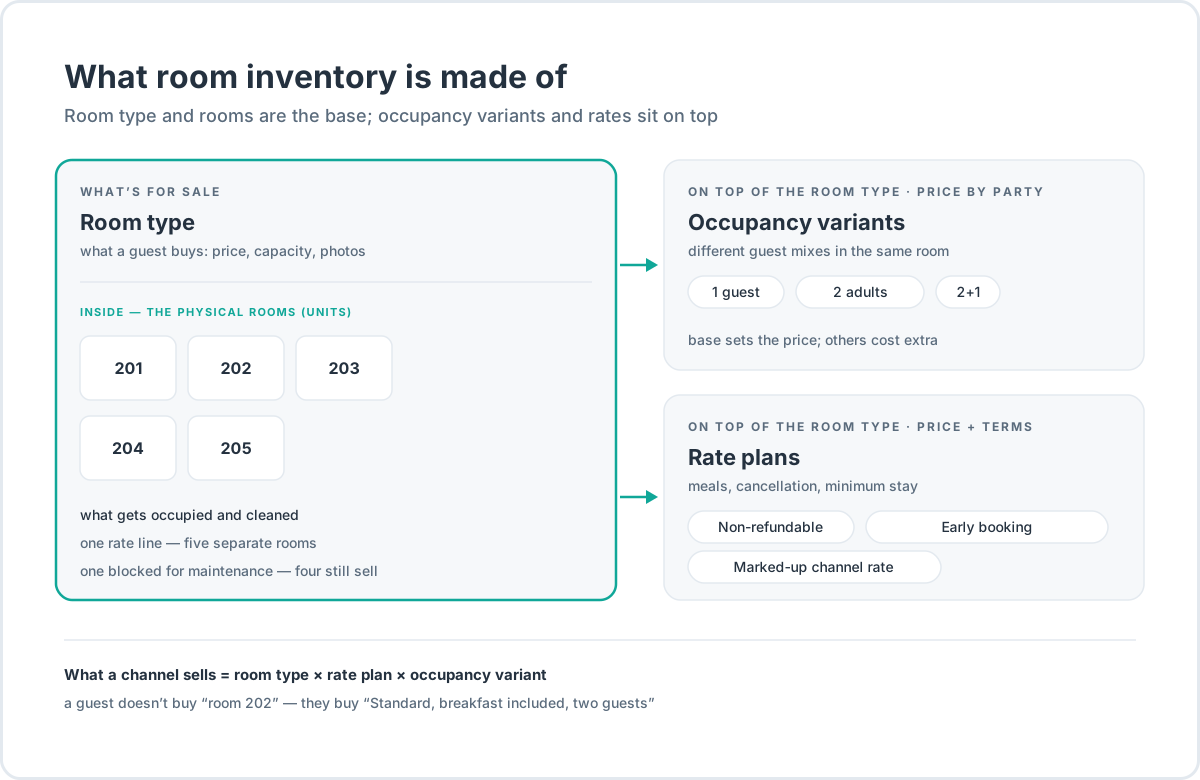
A room type is what gets sold: “Standard,” “Double with balcony,” “Suite.” It carries a price, a capacity, a description, photographs. Wherever the guest books — on the site, in a channel, over the phone — they buy the room type. The room itself they see for the first time on the door.
In a property management system (PMS), room types become the rows everything else is assembled from: rates attach to them, the Planner shows them as rows, and channels, when connected, map onto them.
The room — what gets occupied
Inside a room type live physical rooms — the concrete pieces of inventory: “Standard 201,” “Standard 202.” Industry texts call them units. A “Standard” room type of five rooms is one line on the price sheet and five separate rooms, each with its own state: occupied, free, out for repairs.
The split looks like bureaucracy until a repair happens. One of the five rooms is blocked — the room type keeps selling on the remaining four. The room type sold twice for one evening — one booking moves to a free room of the same type; the guest never notices. Without the physical level, both tasks turn into a manual paper chase through a notebook.
Occupancy variant — what the price is counted from
On top of the room type lives a third axis — occupancy variants: “2 adults,” “2 adults + 1 child,” “1 guest.” These are not separate rooms and not a sub-level inside a room; they are different prices for different guest mixes within the same room type. The base variant sets the base price; the rest are counted as a surcharge or a discount from it.
Next to the variants stands the rate plan — price plus conditions: meals, cancellation rules, minimum stay. A discounted non-refundable rate, early booking, a channel rate marked up to cover the commission — that is all the same room type, sold under different conditions. How to assemble the rates themselves — in the article on pricing a room.
Hence a working formula worth memorizing: the product sold in a channel is room type × rate × occupancy variant. Not “room 202,” but “Standard, breakfast included, two guests.” A multiplication, not a chain: variants and rates lie on top of the room type, not inside one another.
For the running example, take a twelve-room property — it will come in handy again:
| Room type | Rooms | Occupancy variants |
|---|---|---|
| Standard | 5 | 1 guest · 2 guests |
| Standard with balcony | 3 | 2 guests · 2+1 |
| Suite | 2 | 2 guests · 3 guests |
| Single | 2 | 1 guest |
Total: twelve rooms, four room types, seven occupancy variants — and however many rates on top. “Twelve” is only the first floor of the answer.
Edge cases follow the same scheme. A hostel doesn’t sell rooms — it sells beds: the unit is a bed in a dorm, and inventory is counted in beds. An apartment is the opposite: one unit is a whole apartment, living in the system as a separate room type with its own rate. There are also “splittable” units — apartments sold both whole and in parts; for the system those are usually two room types, and without synchronization between them it is easy to sell the same thing twice.
Three operations: what “managing inventory” means
Managing inventory comes down to three repeating operations. Industry standards have a name for the data package that moves in them — ARI: availability, rates, inventory.
First — rates for room types. What each room type costs on each date. The hygiene rule: prices live in rates, not in the booking calendar. The calendar — in a PMS, that is the Planner — shows who is staying where; a price for a date is edited in the rate, and from there it travels to every place the price is sold. If a price can be “fixed in the calendar” bypassing rates, sooner or later one price goes out to the channels while the guest at the front desk hears another. How to build the prices themselves — from reference rates to seasonal ones — in the article on pricing a room.
Second — distribution. Which room types and rates are sold in which channels. Your own site gets everything; a channel — maybe not everything: one channel gets only the standards, another a rate with a marked-up price to cover the commission. The decision is made once, at connection, and lives in the mapping of room types and rates; it gets revisited when the set of channels changes.
Third — keeping availability current. The most daily of the three. A booking sells — availability on the date drops. A cancellation comes — it returns. A room goes out for repair — the room type loses a unit. A group buys out the weekend — the dates close. Inventory changes dozens of times a week, and the operation is one thing: every change must immediately be seen by everyone who sells that inventory — and everyone inside the hotel who uses it. The guest must not hear one price on the phone and see another at the desk; the receptionist must not sell a date that a channel bought out an hour ago.
If there is one system, all three operations live in it: rates in rates, availability in one calendar, distribution in channel settings. If there are three places — a spreadsheet, a channel extranet, the site — every operation turns into three, and that is no longer management but data entry.
Direct and indirect channels: how a channel sees your inventory
A sales channel is any point where a guest can buy a night from you — including your own website. Channels split into direct — a site with a Booking Engine, the phone, the front desk — and indirect: OTAs (online travel agencies) such as Booking.com and Airbnb, agencies, tour operators. Metasearch sits on a separate line: Google Hotels, Tripadvisor. It doesn’t take bookings — it compares prices from several sources and sends the guest to a source, which is why it is counted as neither a direct channel nor an OTA.
The proportion is well known: by an industry report covering 90+ million bookings at independent properties in 2025, 63.4% of bookings come through channels; on some markets, nearly 80%. Worldwide, more than $400 billion in bookings a year passes through OTAs. Channels are the bulk of the demand; arguing with that is pointless — the question is how your inventory is present in them.
The key fact: a channel does not see your inventory. It sees a slice of it — availability by room type for dates, plus the rates you have allowed to be pushed there. When a channel is connected, your room types and rates are paired with the channel’s listings — this is mapping. What isn’t mapped doesn’t sell; what is mapped wrongly sells as the wrong product.
How much inventory to give a channel — there are two models. The first, where nearly all small hotels live, is free sale: the channel sees all free inventory, and every sale anywhere reduces availability everywhere.
The second is allocated volumes — allotments: a channel or tour operator gets a fixed number of rooms for dates, sells them itself, and returns the unsold remainder to the common pool by an agreed deadline. That is B2B machinery — tour-operator contracts and wholesalers; a small property almost never meets it in retail OTAs. The word “quota,” in work with retail channels, means something else entirely: the quantity that a synchronization system has computed for the channel out of your single calendar. You didn’t allocate it — the system calculated it.
And the last thing about channels: their picture of your inventory breathes. The average booking window is 40 days (38 in 2023): guests buy ahead; a month out, dates fill in. 21.8% of OTA bookings cancel, against 10.6% of direct ones — dates don’t only fill in, they open back up. Inventory that was sold out yesterday is partially open again tomorrow — and the other way around.
A channel storefront shows a snapshot, not live inventory
Here is the mechanics that sales pages stay quiet about: between your calendar and the storefront the guest is looking at, there is distance. The channel shows a snapshot of availability, and the snapshot doesn’t refresh instantly. Booking.com’s partner documentation says it outright: processing changes can take up to five minutes; syncing calendars between a system and a channel — up to two hours.
Five minutes sounds harmless — until the last room of a room type is bought by two people. Guest A books on Booking.com; guest B, in the same minute, on Airbnb. Both snapshots are fresh, both show the room free, both bookings go through. Nobody made an error — this is a race, built into the very mechanics of distributed sales. Nothing eliminates it completely; the honest goal is to squeeze the window from hours to minutes, and to see the conflict the moment it happens anyway.
Hence also the rule Booking.com itself gives: keep your calendar and rates in one place. An edit made at the same time in the channel extranet and in the synchronization system can diverge — and the channel will keep its version.
Desync: three systems see three different inventories
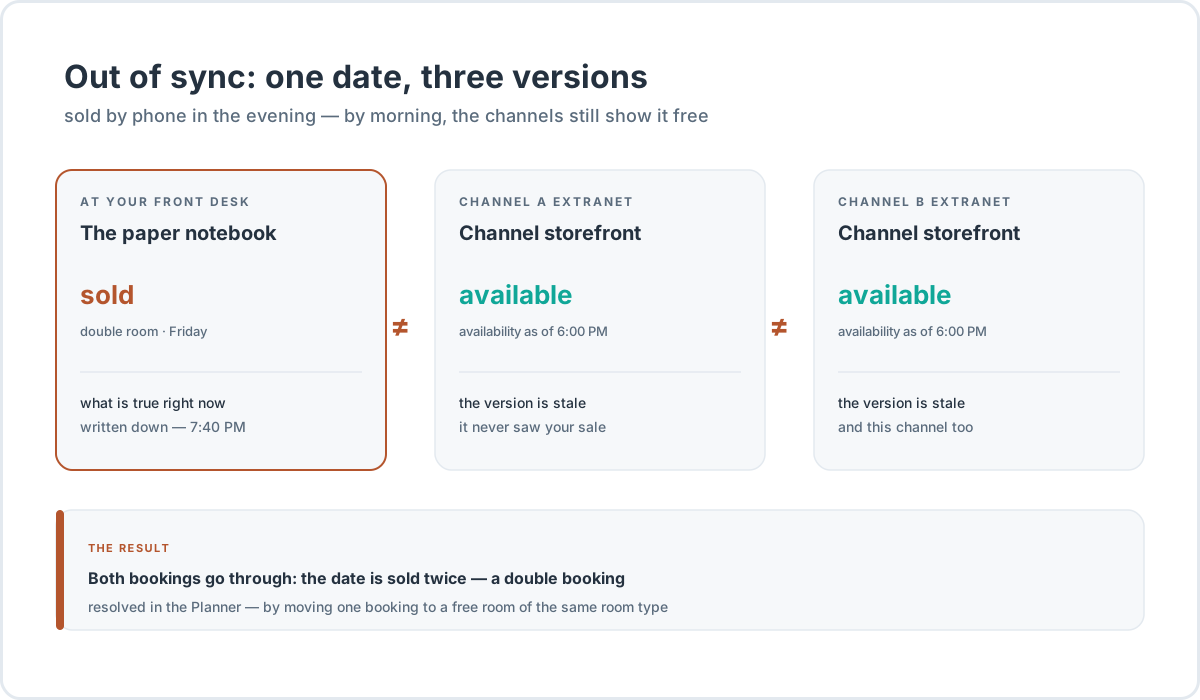
The race of two guests is the fast variant. The slow one, far more common: the inventory simply has no single source of truth. The spreadsheet at the desk says one thing, the Booking.com extranet another, the Airbnb extranet a third. Sold over the phone — the spreadsheet gets a minus, the extranets don’t. Cancelled in a channel — the spreadsheet never learns. Every system keeps its own version of the same date, and the versions drift apart not because somebody works badly, but because there is nobody to reconcile them.
The ending is predictable: one date sells twice. It is called a double booking — in the industry, the same cases get called overbooking too. The strict meaning of “overbooking” is slightly different — a deliberate oversell against expected no-shows, a practice of large hotels with forecasting; at a small property the oversell is always accidental, and it happens precisely because of desync. What it ends in, for the guest and the hotel, is well known: a walk to another property at your expense, a taxi, apologies, a bad review. Booking.com adds a material detail: for a double booking over the limit, the channel charges a commission as if the booking had taken place. For a walkthrough of what to do when a double booking has already happened — in the article on overbooking.
The cure for desync is one, and it is boring: a single pool of availability. All sales out of one calendar; all channels get quotas computed from it; all bookings flow back into it. The last room of a room type sells — every channel shows zero for that date, by the same mechanism as any other edit. Sales close on a date — quotas zero out everywhere with one edit. That is exactly what the Channel Manager does — the layer between your system and the channels: outward, rates, availability and restrictions; back, bookings, changes and cancellations.
An honesty caveat, common to all synchronization: a single pool squeezes the race window down to minutes, but it doesn’t cancel the race. Double bookings happen with a channel manager too — there are simply an order of magnitude fewer of them, and each one is visible at once instead of being discovered by the guest at the front desk. A conflicting booking goes into handling and is resolved in the Planner — by moving it to a free room of the same room type.
Inventory accuracy is also visibility
Inaccurate inventory has a price that never shows up in reports: the property disappears from search results. Booking.com’s documentation puts it bluntly: if a property has no availability for the dates a guest is searching, it may not appear in the results at all. Not “lower in the list” — absent. Airbnb advises the same from the other side: open up dates in your calendar, and more guests will find you.
Hence the practical consequences for inventory. First — the horizon: Booking.com recommends keeping the calendar open 24 months ahead; empty far-future dates are not “too early,” they are absence from the search of everyone who plans ahead. Second — restrictions: a minimum stay and a closed arrival on a date narrow the set of queries the property matches; the more restrictions, the fewer queries find you. How a position in a channel actually works is broken down in the article on OTA ranking algorithms; the fact that matters here: accurate, open availability is the condition for being shown, without which nothing else matters.
Typical mistakes of a small hotel
Inventory-management mistakes repeat from property to property. The six most common.
Manual transfer instead of a system. A booking arrives — you go into the other extranets and close the date. It cancels — you open it back up. Each operation is trivial; the problem is the pauses between them. The window between a booking in one channel and the closing of the date in the rest is a double-booking window. Manual mode works while there is one channel; with a second it starts making errors; with a third, errors are a matter of time.
The tab-by-tab routine. Open a channel, adjust the prices, open the next tab, repeat. Industry automation practitioners state a threshold plainly: from three or more OTAs, manual updating stops being a working mode — updates fragment, some channels get forgotten, rates freeze at yesterday’s.
Forgotten stop-sales in channel extranets. A hard closure set by hand in a channel’s extranet lives on the channel’s side and overrides your system’s push: the channel shows zero, your system sends a one — and zero is what stays. The fix is a reconciliation: what the channel shows, against what your calendar says. Scheduled closures live in your own system; a stop-sell in a channel extranet is an emergency tool — how it differs from closed dates and restrictions is in a separate breakdown.
Broken mapping after renaming a room type. You rename “Standard” to “Classic” — and the mapping in the channel is left hanging in mid-air: data goes to the wrong listing, or nowhere at all. Worse: a mapping error scatters across all the channels at once. The rule: renamed a room type — the same day, check the mapping in every channel.
Forgotten blocks. A room was blocked for repairs in September; the repair ended in October; the block hangs until December. For months the room type is “short” one room, sales run below what they could have been, and nobody remembers why. A block is a useful tool; a forgotten block is a hole in the inventory.
Hedging “just in case.” Properties without synchronization often push to channels not the whole inventory but a “safe” half: what if we don’t manage to close the date in time. Inventory hidden in a closet is unsold weekends: in high season it would have sold, but the channels never knew. A single calendar doesn’t cancel the fear — it makes the fear unnecessary.
How this looks in HotelsCalendar
Briefly, how the operations above look in the system — without promises the product doesn’t keep.
Inventory is set up once. Room types — with descriptions, photos and capacity; inside the room types, the physical rooms. Occupancy variants live in the room type card: the base guest mix sets the base price, the rest as surcharges; variants are generated with a button, and surcharges recalculate automatically. Rates are a separate layer, with inheritance: a parent rate holds the prices, child rates compute from it by discount or markup.
The Planner is the inventory screen. Rows are room types with a “Room type · N/M” counter (N — rooms with bookings over the period, M — total), columns are dates, and inside are bookings from every source, each tagged with where it came from. The “Prices in cells” toggle puts the price and availability for the date into the cells. The Planner holds bookings; prices are edited in rates — not a matter of taste, but protection from an accidental edit traveling out to the channels. Blocking a room is a click on a cell; blocks drag like bookings do. A double booking, when it does happen, is resolved right here: click the conflict — move it to a free room of the same room type. OTA bookings, group bookings and bookings of five or more rooms are not moved by mouse — protection from desync with the channels.
Channels feed from the same calendar. Quotas are not stored per channel — they are computed from the single PMS calendar. Closing sales on a date zeroes the quotas in every channel with one edit. Restrictions — minimum stay, closed arrivals and departures — go out to the channels in a package with prices and availability; the push covers two years ahead (some channels cap the horizon shorter — that is their own limitation). Connection is the mapping of room types and rates, then connection statuses (active, paused, error) and a delivery log: which channel, which period, which status. Sync across all channels can be run manually with one action — for exactly those “the channel shows something odd” cases.
Honest limits. There is no occupancy percentage in the interface — only absolutes: “Staying now” and “Rooms free” on the dashboard, “Room type · N/M” in the Planner; the percentage, if you want it, is counted by hand. There is no separate “how much is free on a date” report either — that picture assembles in the Planner with the “Prices in cells” toggle on. And how much of the inventory is already sold for future dates — the OTB metric — is covered by a separate article: it is counted exactly on top of the structure described here.
If you are only choosing a system, the order is simple: inventory first (room types and rooms), then rates, then channels, and the booking widget for the site last. Why the sequence matters more than the shopping list — in the article on software for a small hotel.
Syncing inventory across channels is the part of the job you cannot keep up with by hand: the Channel Manager keeps availability, rates and restrictions identical in every channel and returns bookings into the same Planner.
The takeaway
- Inventory is not “how many rooms” but a structure: room types, physical rooms inside them, occupancy variants and rates on top. The product sold = room type × rate × occupancy variant.
- Managing inventory is three operations: rates for room types, distribution across channels, keeping availability current.
- A channel sees a slice of the inventory — availability by room type and rates, through mapping; the storefront shows a snapshot that refreshes in minutes.
- Desync breeds double bookings; the cure is a single availability pool, from which channels receive computed quotas.
- Accurate, open inventory is the condition for being shown in channel search: empty dates and excess restrictions throw the property out of the results.
- The mistakes repeat: manual transfer, the tab-by-tab routine, forgotten stop-sales, broken mapping, forgotten blocks, inventory hidden “just in case.”
Frequently asked questions
How is a room type different from a room?
A room type is what is sold: price, capacity, description, photos. A room is a concrete unit inside the room type — the thing that gets occupied and cleaned. The guest buys the room type; the system or the receptionist assigns the specific room for the dates. That is why they are filled in separately in settings: first room types, then rooms inside them — setting up any system starts there (the software map for a small hotel).
How is inventory different from availability?
Inventory is the whole product a property can sell: all room types, rooms, occupancy variants. Availability is how much of that inventory is free on a specific date; it is the guest-facing word — the site and the channels show it. How much of it is already sold for future dates is a different question — answered by the OTB (on the books) metric, counted on top of inventory.
How do you count room inventory?
As the sum of rooms across room types: five Standards plus three with a balcony plus two Suites plus two Singles — twelve. For a hostel, inventory is counted in beds: in a dorm, beds are sold, not rooms. There is no occupancy percentage in the interface: the PMS shows absolutes — “Rooms free” on the dashboard, “Room type · N/M” in the Planner; the percentage, if needed, is counted by hand: occupied ÷ all rooms.
What to show channels: the whole inventory or allocated quotas?
For a small property in retail channels — the whole inventory in free sale: the channel sees everything that is free, and every sale reduces availability everywhere. Allocated volumes (allotments) are the machinery of tour operators and wholesalers: you fix a volume for dates, and the unsold part returns by an agreed deadline. Retail-channel “quotas” are not allocations: they are computed from the single calendar automatically — how that machinery works is in the article on the Channel Manager.
One room under repair — do I need to close the room type?
No. A repair of one room is a block of that specific room in the Planner, and the room type keeps selling on the remaining rooms. Sales for a date are closed entirely in other cases: when the service is impossible for everyone (no water, noisy works across a whole floor) or when the dates have been bought out by a group. How a channel stop-sell, a closed date and restrictions differ from one another — in the stop-sell breakdown.
How many room types should a small hotel set up?
As many as genuinely differ: by price, by capacity, and by what the guest sees in the photos. On twelve rooms that is usually three or four; every extra one is another price row that has to be filled in, and another position in every channel’s mapping. A separate apartment is a separate room type with its own rate. And remember the mapping: renaming room types later has to be reflected in every channel — how it all connects.