Notes for hoteliers
How the OTA algorithm works: what decides where you rank on Booking.com and Airbnb
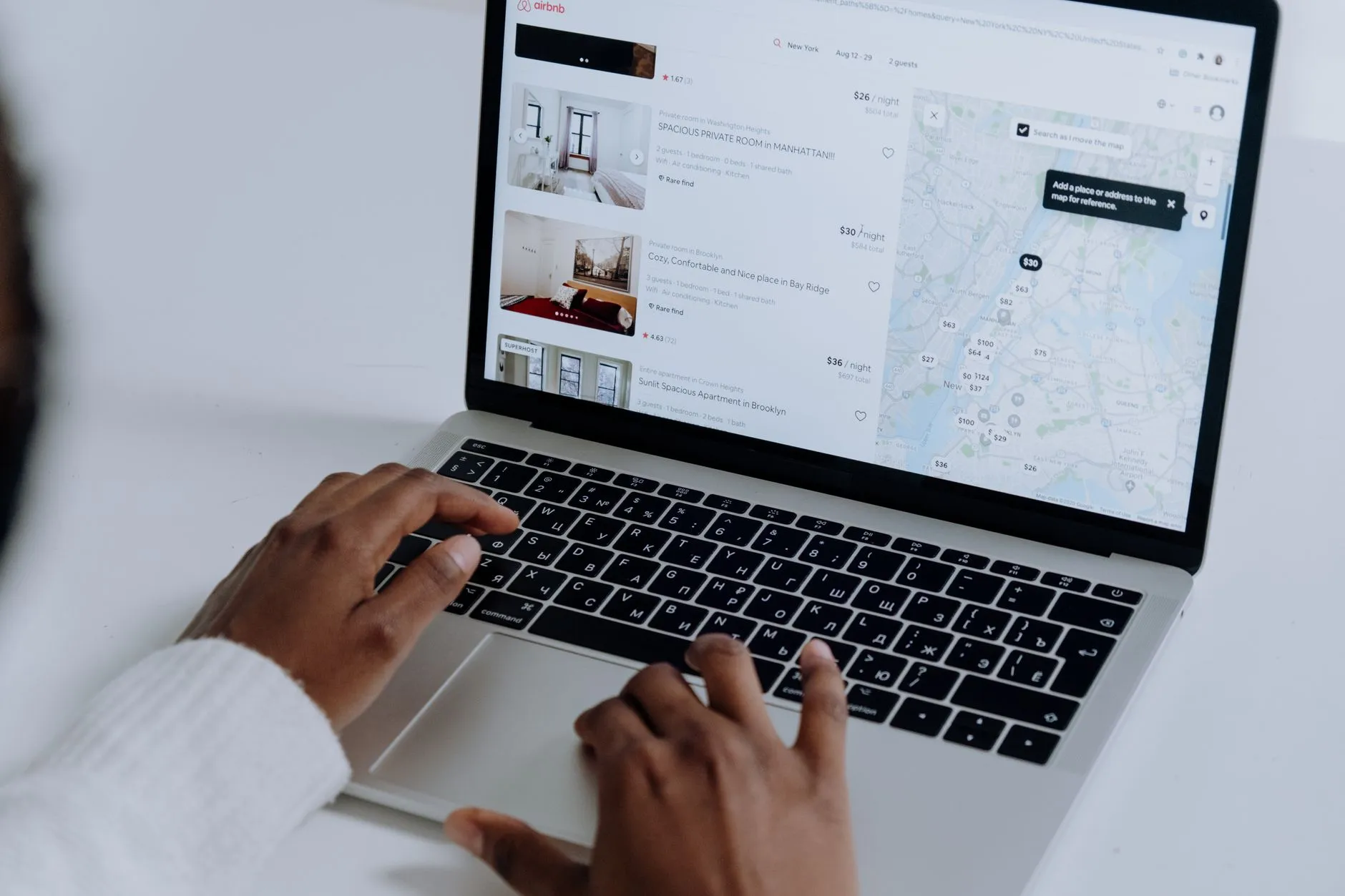
cottonbro studio / Pexels
You open Booking.com in an incognito window, type in your city and your dates, and go looking for yourself. There you are: same photos, same prices as in your rates. Above you—the hotel across the street. Smaller rooms. A review score half a point lower. The obvious question: what exactly did it do to earn the first line?
What usually follows is mythology about “the algorithm”: a secret formula you can buy, hack, or beg out of support. OTAs—online travel agencies: Booking.com, Airbnb, Expedia, and their neighbors in the results—are the subject here (what an OTA is and what channels cost). The truth is duller and more useful. Neither platform publishes the formula, but both officially name the factor groups the order is built from, and Booking.com separately spells out what is in your hands. Below: what Booking.com says, what Airbnb says, what gets fixed in your dashboard, and what nobody’s hands reach at all.
And one setting without which the rest won’t come together: there is no single position.
First, the main thing: there is no single position
A guest doesn’t search “in general.” They search a specific query: city, dates, number of guests. For every combination, the results are assembled from scratch. Booking.com’s help center says it without hedging: the value of each factor is determined dynamically for each specific search, and is “not based on a fixed weight of factors.”
The guest edits the picture further. Sort by price, filter by review score, “parking only,” check-in times—every filter switched on assembles a different result set someone has fallen out of. The third layer is personalization: results are personalized for each traveler, built on search history, country, and language. The same property shows differently to two people on the same evening.
Hence the working rule. The question “what position are we on?” is malformed: the answer depends on who is looking, from where, and with which dates. Don’t measure your position—measure what the platform itself counts: impressions in search results, visits to your property page, bookings. Booking.com’s Extranet has a panel for exactly that. It’s an honest visibility metric—unlike your place in one list on one laptop.
Booking.com’s four factor groups
The partner help center lists four groups. They sound like this.
Property characteristics—location, prices on Booking.com, guest review scores, property page quality. Everything that belongs to the offer itself: where you are, what you charge, what guests say, and how complete your page is.
Performance metrics—conversion and click-through rate. The definitions are precise, worth reading once slowly: conversion is the share of property page visits that end in a booking; click-through is how often guests move from the results to your page. In plain words: of those who saw you, how many clicked—and of those who clicked, how many booked.
The traveler’s search—destination, dates, length of stay, number and type of guests. You influence this group not at all: the guest has already decided where and when they’re going. But it decides which of your strengths make it into the frame—a property by the sea and a property by the station live in different searches.
Traveler preferences—search history, country, language.
So two of the four groups are about your property and its results; two are about the guest. Half the formula isn’t yours to command—better to accept that before spending a season tilting at windmills.
Airbnb: price, quality, popularity, and location
Airbnb has its own four: quality, popularity, price, and—for whole homes—location. The difference starts with the noun: Booking.com ranks a property, Airbnb ranks a listing. Now the decoding, from the platform’s help center.
Quality is the listing’s content: photos and video, ratings and reviews, host–guest communication on the platform, amenities, service information. The direct wording: “Higher quality listings with better ratings and reviews tend to rank higher.”
Popularity—wishlists, bookings, messages to the host: “More popular listings tend to rank higher.”
Price—the one place where a platform said the effect straight out: “Listings that are priced below other comparable listings in the area with similar characteristics, such as guest capacity and amenities for homes, tend to rank higher in search.” The operative word is comparable—the same guest capacity, the same amenities—not cheaper than everyone, no matter what.
Location at Airbnb is a full factor for whole homes; at Booking.com, location lives inside property characteristics.
| What gets judged | Booking.com—a property | Airbnb—a listing |
|---|---|---|
| Content | property page quality | photos, video, description, amenities |
| Reviews | guest review scores | ratings and reviews, inside quality |
| Price | prices on Booking.com | below comparable—higher in search |
| Guest behavior | conversion and click-through rate | bookings, wishlists, messages |
| Host actions | — | replies within 24 hours, decline rate, cancellations |
| Location | location | location—a factor for whole homes |
A separate Airbnb layer is the host’s levers, one list in the help center: respond to inquiries within 24 hours, try not to decline too often, turn on Instant Book; reduce restrictions, like the minimum and maximum length of stay; open dates on your calendar, and more guests will find you. Add Superhost status: its requirements include fast responses and a minimum of host cancellations. All of it is hand work in the dashboard—no software presses “reply to the guest” for you.
Availability: a condition of entry, not a factor
A persistent claim circulates here: “for Booking.com, availability is the number-one ranking factor.” The platform’s current help center doesn’t say that—and this is a case where the debunking is more useful than the beautiful version.
How it’s actually worded: availability is absent from the list of ranking factors altogether. What’s there instead: search ranking “determines where available properties are displayed.” The partner guide goes further: “If your property isn’t available for the dates travelers are looking for, you may not show up in their search results.” Open dates aren’t points added to a score—they’re the ticket to the match. Without one you don’t take the field, and no factor weights pull you through.
Airbnb describes the same mechanics as a host lever: the more dates available, the likelier a match with a guest’s plans—“adding availability may improve the visibility of a listing.”
One practical conclusion: open the calendar far ahead. Travelers start looking up to a year in advance, and Booking.com’s advice is to keep the calendar open as far as 24 months ahead. For a 9–30 room property, pushing two years of dates into several channels by hand is a job of constant attention—exactly the job a Channel Manager takes over: once room types and rates are mapped, availability and prices upload to the channels automatically, two years ahead.
Restrictions that can hide a property entirely
The second not-obvious layer: sales restrictions. Booking.com gives them a section of their own in the partner guide: “Restrictions give you control over the bookings you receive and are another important tool to influence your visibility.” And then the key line: “If a traveler looks for a stay that you’ve set a restriction for, you might not show up.” Airbnb repeats the same thought in its list of levers: reduce restrictions, like the minimum and maximum length of stay.
What exactly cuts visibility: minimum and maximum stay, days closed to arrival and departure, limits on lead time, sales closed for a date. Each has its job: minimum stay protects the weekends; a closed arrival day fences off one-night midweek bookings. Together they work as a sieve: the guest searching “Thursday to Sunday, two nights minimum” drops out of your results before ever seeing a photo.
The difference from availability is subtle but important. Closed dates—you aren’t participating. A restriction—you participate in thousands of searches but filtered this one out yourself, and probably forgot setting it. Review restrictions every season, not once forever.
They don’t live in individual date cells; they live in rates. How to build a set of rates with restrictions for weekdays, weekends, and high season—in the article on pricing your rooms.
Price: competitive, not lowest
At Booking.com, price sits inside property characteristics—the platform names “prices on Booking.com” among its factors and advises keeping them competitive. At Airbnb, as we saw, the wording is even more concrete: below comparable listings—higher in search.
Reading that as a call to undercut everyone is a mistake that costs more than a position. A pushed-down rate brings bookings, bookings bring occupancy—and the money at month’s end still comes up short. The sane scheme is different: find the floor below which selling doesn’t pay, keep the base rate honest, and raise it at the top of demand.
About that top the platforms say nothing; the market settled it long ago. A rate that tracks demand—up on weekends, down on empty weekdays—is competitive by itself, because it sits in a sensible corridor at every moment. How to set up that kind of movement without expensive systems—in the article on revenue management.
Separately, two sentences on parity. In countries without parity—all of the European Economic Area—Booking.com writes outright: prices and other commercial terms offered outside the platform are not taken into account when determining position. In practice, a lower price on your own website in Europe doesn’t spoil your position in the channel—the fear “they’ll push us down for a cheaper price on our site” no longer works there.
The listing page: photos, amenities, description
Now for what the guest sees whole. Property page quality is a named Booking.com factor; listing content is part of quality at Airbnb. The most-quoted number of this topic belongs to Booking.com itself: 63% of guests use photos as their primary source of information while searching for a stay. Not prices, not reviews—photos.
What follows in practice. The first photo works as a cover: in the list, it’s what the guest looks at while deciding whether to click. Amenities are not page decoration—they are the guest’s filters: whoever ticks “parking” and “breakfast” won’t see a property with those fields blank; the platform will honestly filter it out. The description answers what didn’t fit in amenities: where the parking is, whether pets are allowed, what breakfast actually means.
An honest boundary: uploading photos to the channels is not something small-property software usually does—HotelsCalendar included. This section, then, is about work on the platform: revisit the photo set once a season, fill amenities in completely, reread the description with a stranger’s eyes. An underfilled page loses impressions even at a good price—no synchronization compensates for that.
Impressions, clicks, bookings: a cycle that feeds itself
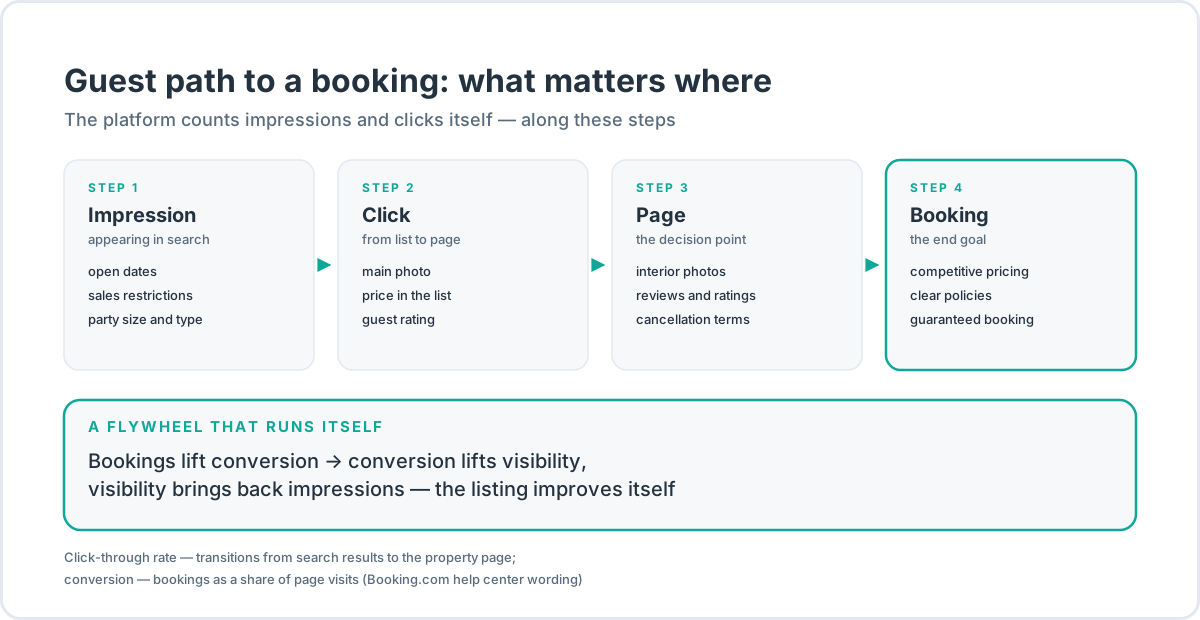
The most curious thing about these factors: they are tied into a cycle. The property appeared → the guest clicked → booked on the page → the platform counted higher conversion → showed the property more often → impressions again. A page that works pumps itself up; a page that doesn’t squeezes itself out of the results just as diligently.
Hence a natural order of work. First, what the cycle can’t start without: open dates and sane restrictions. Then what turns an impression into a click: the first photo, the price, the review score. Then what turns a click into a booking: the description, the reviews, cancellation terms a human can parse.
A little arithmetic on a notional 1,000 impressions. At a 2% click-through rate, 1,000 impressions give 20 clicks; at 5% conversion, that’s 1 booking. Then a fork of three paths. First—get more impressions, meaning taking them from competitors working the same factors. Second—raise the click-through rate to 4%: the same 1,000 impressions give 40 clicks and 2 bookings. Third—raise conversion to 10%: the same 20 clicks give 2 bookings. The first path is someone else’s and expensive; the other two are yours. That is exactly why the platforms measure performance, not place in a list.
Some items are done only by hand. Response speed, the share of declined inquiries, Instant Book, host cancellations—the platforms count these as quality, and no property has an automation that answers a guest for you. The one pairing where software helps is cancellations: fewer of them where the booking is secured. A rate with a deposit or prepayment cuts off no-shows in advance—how such rates are built.
Paid visibility programs: what they give and what they cost
Beyond the organic order, Booking.com runs paid programs—and it matters what exactly they sell.
The Preferred Partner program: by the platform’s own data, participants get 65% more views and 35% more bookings on average. Preferred Plus—the upper echelon: the top 10% of Preferred properties. Genius—a discount program: more visibility for the property, with the discount paid by the property itself. Visibility Booster—a temporary lift in selected countries and on selected dates. Deals—taking part in the platform’s sale campaigns. Off to the side lives Sponsored Listings: paid positions in the results, where placement is set by a bid-per-click auction.
What they share: a purchase of visibility, not position. The platform’s wording is careful—“gain greater visibility”—with no guarantee of a top line anywhere. Entry isn’t for everyone: “your property needs to meet certain eligibility criteria”—check them under the Boost performance tab in the Extranet.
What it costs. Preferred adds about three percentage points to the commission on top of the base rate (a market estimate—roughly 15%); Genius discounts are paid out of your pocket too. The thing to add this to isn’t “position”; it’s the economics of the channel: what a booking brings in, what the commission and the programs eat—the OTA article does that arithmetic.
What not to do: three short stories
Buying a “guaranteed top spot.” Even the paid programs guarantee no position—they speak carefully of greater visibility, and the only purchasable place in the results, Sponsored Listings, works as a click auction. A promise of the first line within a month is a promise about something the seller doesn’t control: the platform recalculates factor weights for every search and never publishes them.
Inflating clicks and reviews. A click farm hits the very metric you lean on. A click without a booking reads as a minus to conversion: the page was viewed, the viewer left. A thousand such clicks moves the number down, not up. Reviews are a similar story: guest ratings are the platform’s chief asset—the trust of the whole results page stands on them—risking that for a couple of extra stars doesn’t pay.
Dumping rates through the floor. The fastest way up in Airbnb’s results is a price below comparable listings—and the fastest way to occupancy without money: bookings exist, money doesn’t, and after the channel commission there’s less than before the season. What works is a floor and a competitive base rate, not a race downward.
The boring truth: what works is everything listed above—open dates, sane restrictions, a competitive price, a living page, fast replies to guests. None of it can be bought in a month, and exactly for that reason it keeps working longer than a month.
The property isn’t in the results: eight checks, in order
A common case: the property is alive, the rooms are free, and it isn’t in the results. In order:
- Are the dates open. The most frequent cause and the cheapest check: if sales are closed for the requested dates, the property isn’t in the results at all.
- Rate restrictions. Minimum stay, days closed to arrival and departure, limits on lead time. Often set once for one season—and left living there for years.
- Sales closed on the channel. Sales may have been closed for the date in the channel’s dashboard or in your own system—the channel’s availability sits at zero.
- The link to your system. If availability goes out automatically, open the delivery log: what left, when, and what status the connection shows—active, paused, error.
- The guest’s filters. Search with filters off and no price sorting: the property may be there, mid-list, in a stretch you didn’t finish scrolling.
- Amenities. Unfilled amenities throw the property out of filtered results—the guest will never see it there.
- The main photo. The property is there, but there are no clicks: the cover doesn’t work, and impressions don’t become visits.
- Price and review score. The property is visible, but on the last pages: that’s no longer “invisibility,” that’s competitiveness—back to the earlier sections.
The first four items are things you switched off yourself; the rest are things you haven’t finished turning up. The difference matters: the first kind is fixed in an evening, the second takes a season.
Visibility beyond the channel: a short list
While you fight for a line in the results, the results are changing shape. In Google’s metasearch—where prices from different sources are compared—every property has a free entrance: Google free booking links—the property’s prices and a direct link to the booking page on your own website; the paid layer there is promotion, not presence.
How guests search is changing too. Hotel booking is appearing inside AI assistants, and industry publications describe the shift like this: instead of browsing a dozen options, the guest gets a short list of two or three—a practitioners’ estimate, not a measurement, but the direction is right. The shorter the list, the less “position” decides and the more making the list does. And making lists starts with data: the channels and the metasearch engines must hold your current prices and available rooms.
The direct channel fits into this picture too: free booking links lead to the booking page on your website, not to a channel dashboard. For prices to have somewhere to lead the guest, the site needs a booking page—a Booking Engine. What it should be able to do for this kind of visibility—in the Booking Engine guide.
What software does here—and what it doesn’t
Now, honestly: what of this gets automated, and what doesn’t.
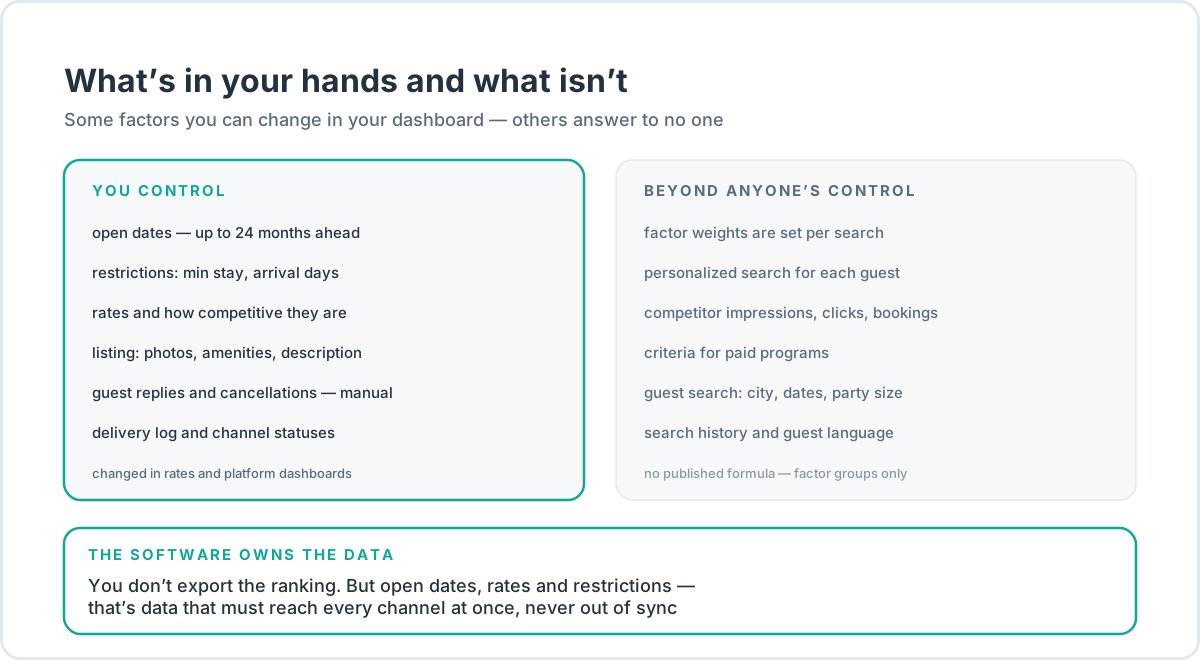
A position is not bought, not exported, not “boosted”—software promising rank growth is a red flag. But position has inputs that aren’t position at all; they’re pure data: open dates, restrictions, rates. That data must reach all the channels at once, without desync—desync costs not position but presence: closed the room in one channel, forgot in another, and there’s a booking you’ll have to walk.
Booking.com’s partner guide advises it directly: manage the calendar, rates, and restrictions through a connectivity provider—the intermediary a property runs its channels through—rather than through the Extranet; “this ensures your changes are properly saved.” That is, in effect, an official job description for a Channel Manager. Ours works like this: the quota for a date is computed from the single PMS calendar, not a separate counter per channel; close sales on a date and quotas zero out in every channel; change a rate or restriction and the changes go out automatically; a booking from a channel returns to the calendar on its own, visible in the Planner with its source marked. The delivery log shows what went where and when; connection statuses read active, paused, error; if something goes wrong, one action runs a manual sync. The catalog lists more than a hundred channels; connecting one is a couple of dialogs plus mapping room types.
What software doesn’t do—and doesn’t promise: answer guests for you, write reviews, choose your rates, guarantee a position. A reply within 24 hours, declined inquiries, cancellations, Instant Book—that’s your work on the platform, by hand. Software has exactly one job here: freeing time for it—no carrying dates between dashboards, no checking availability by eye, no keying channel bookings into the Planner by hand.
Position is an output, not an input
Collect the article into one sentence: the platforms amplify properties that already sell and already bring guests back happy. Not the other way around.
So the order of work. Open the dates far ahead and drop the extra restrictions—that’s the condition of entry. Put the page and the price in order—that’s the chance at a click and a booking. Give bookings a guarantee and guests fast replies—that’s what the platform counts as quality. Only then look into impression statistics—not for position’s sake, but for the pace of bookings: how it’s counted and why future dates deserve a watchful eye—in the article on OTB.
And if you’re only assembling a property’s systems, all of this rests on a minimum stack: a PMS, a Channel Manager, a Booking Engine. Where to start and what not to buy early—in the article on software for a small hotel.
Frequently asked questions
Is availability the main ranking factor on Booking.com?
No. In the platform’s current help center, availability isn’t on the list of ranking factors: it’s a condition of being shown—no open dates for a guest’s search, no property in the results at all. Among the properties shown, position is decided by page quality, prices, review scores, conversion, and click-through rate, with weights recalculated for every search. Keeping open dates in sync across every channel—on the Channel Manager page.
Why is the property missing from the results when the rooms are free?
Check in order: open dates for the requested period, rate restrictions (minimum stay, days closed to arrival and departure), sales closed for the date, the delivery log—did the change reach the channel, what status the connection shows. Then the guest’s filters, unfilled amenities, a weak main photo, price. The first four cause complete invisibility; the rest cause low impressions. Building rates with restrictions for a season—in the article on pricing your rooms.
How far ahead should the calendar open?
Booking.com advises keeping the calendar open as far as 24 months ahead: travelers start looking up to a year in advance. Airbnb’s logic is the same: the more open dates, the likelier a match with the guest’s plans. Two years of dates across several channels don’t survive manual upkeep—the calendar must be one, in the PMS, distributed to the channels by a Channel Manager.
Is it worth paying for Preferred Partner, Genius, or Visibility Booster?
It’s a purchase of visibility, not position: no guarantee of a top line. By Booking.com’s own data, the Preferred program gives 65% more views and 35% more bookings on average—but costs a commission surcharge of about three percentage points over the base rate (a market estimate of around 15%), and entry requires meeting the eligibility criteria. The decision runs on channel economics, not the program catalog—how to count it.
Will a channel manager raise the property’s position?
No—and honest software doesn’t promise it. A Channel Manager does a different thing: availability, rates, and restrictions reach all channels at once, without desync—so you’re simply present in the results for the right dates, and bookings return to the calendar with their source marked. Position remains with the page, the price, the reviews, and guest behavior—how it works.
How do you know visibility has grown?
Not by your place in a list: every guest gets their own results. Look at impressions in search, visits to the property page, and above all bookings—occupancy, average rate, booking pace against the same dates last year. Counting those numbers without analytics—in the ADR article.