


Notes for hoteliers
Stop-sell and sales restrictions: how to open and close dates at your hotel

Harri Hofer / Pexels
Thursday evening. The phone rings at an eleven-room hotel: a regular guest — his sister is getting married. He needs five doubles for the Saturday two weeks out, and two more rooms from Friday. You say yes on the spot; it is the best booking of the month. And the task lands immediately: seven of those rooms are still open in the channels, and while you draft the invoice, any of the dates can be bought out from under you.
What most people do next is open the Booking.com Extranet and close the dates by hand. It works — until the first desync: an Airbnb booking for a date you had pinched shut arrives anyway, and the evening ends in apologies and a move to the hotel across the street.
The root of the problem is that “closing dates” is not one operation but three different mechanisms: a stop-sell on the channel, a closed date in your own system, and sales restrictions. Different mechanics, different consequences, different working times. Below: how they differ, when each one applies, how a closure spreads across the channels — and what each of them costs.
Why a hotel closes dates at all
A closed date is not “no rooms.” It is a decision: on these dates the inventory sells not to everyone and not on every condition. The reasons repeat from property to property.
Repairs and maintenance. A phased renovation, windows replaced across a floor, two days without hot water. The dates belong to the hotel, not to the guests. One nuance: a single room under repair is not a closed sale. That one room gets a maintenance block in the Planner, and the room type keeps selling its remaining rooms. A date is closed wholesale only when the service is impossible for everyone: no water, no power, noisy work across a whole floor.
Your own events. A wedding in the family, a corporate stay for partners, a photo shoot in the rooms. A group buys out the dates — you pull them from open sale while the invoice is still unpaid. The oldest mistake in the book: you shake hands with the group, forget to close the dates, a channel guest buys out the top date — and the group moves to the hotel across the road. Usually such dates are closed not fully but only to the channels: the group is dealing with you directly anyway, and there is nothing to hide from your own sales — exactly the “No OTA” case from the next section.
City-wide events — where you usually don’t close. A festival, a fair, a championship: demand on those dates outruns supply, and closing them to guests means handing money away. This case is worked differently — with a restriction and a price: a minimum stay on the peak dates, a surcharge on a single night. Exactly how — below.
Double-booking prevention. An open date you have already promised to a group is a date that sells a second time. The mechanics of that failure and what to do when it has already happened — in the article on overbooking.
Three mechanisms: stop-sell, closed date, restriction
A stop-sell on the channel
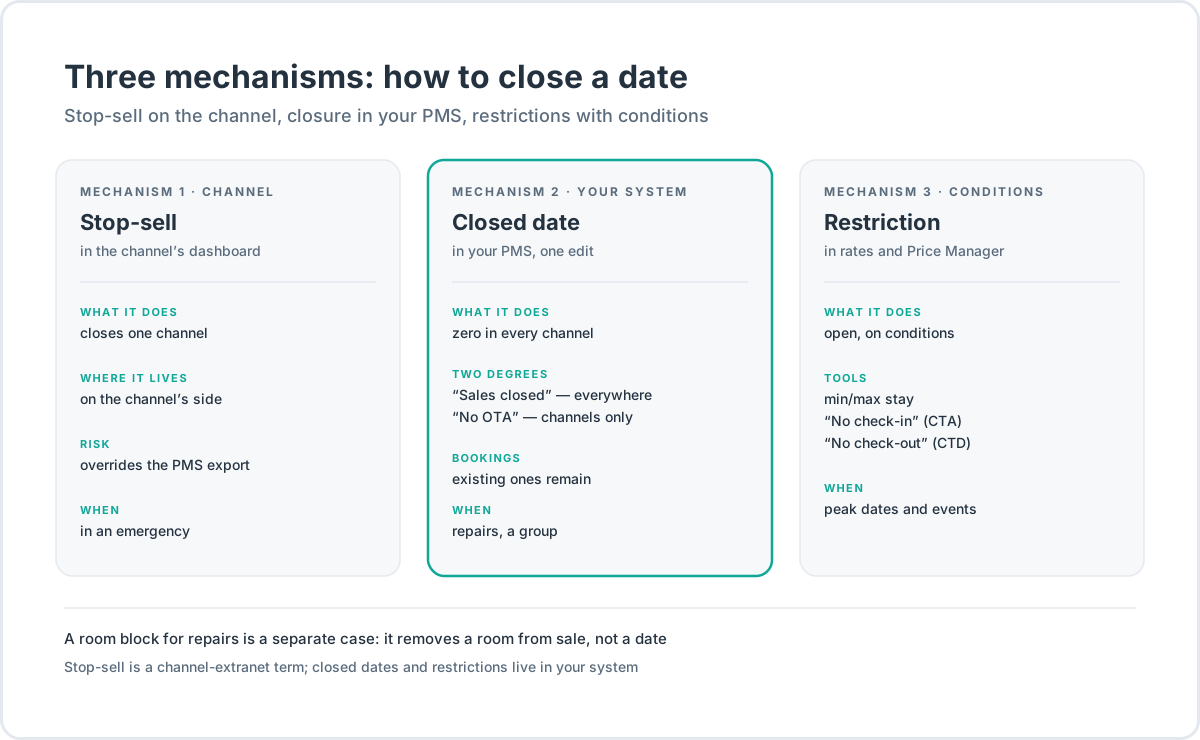
A stop-sell is the closure of sales on one specific channel, in that channel’s dashboard. The term came from the extranets of the OTAs (online travel agencies) and still lives there: at Booking.com it is a room type or the whole property closed in the Extranet calendar; at Airbnb, a night blocked with a toggle in the listing’s calendar.
In the Booking.com Extranet the mechanics look like this: a room type’s “rooms to sell” counter for a date is zeroed by hand, and for the whole property there is a temporary-closure mode (snooze) — the property disappears from the results entirely for a couple of days, for a vacation or an accident. And here is what matters: once that counter stands at a hand-set zero, it stays at zero. A hard closure set in the channel’s dashboard holds even while your sync system keeps sending fresh availability there.
The defining property of this closure: it is the channel’s decision, not your system’s. Booking.com warns about it outright — edits made in the Extranet and through a channel manager at the same time can disagree — and advises picking one source of truth.
Hence the practical conclusion: a stop-sell on a channel is an emergency tool. It happens that the date should have been closed yesterday and there is no way into your own system — then closing by hand in the channel’s dashboard is right and necessary. But planned closures live in your own system, from where they spread to every channel at once. Otherwise, sooner or later, one channel shows the date closed while another sells it — and that is a window for a double booking.
A closed date in your own system
This is the closure inside your property management system — the PMS. Two degrees.
“Sales closed” is the full closure of a date. The channels receive zero availability for it, and the direct channel doesn’t sell it either. Scenarios: repairs, a group, force majeure.
“Closed to OTA” / “No OTA” closes the channels only. The date keeps selling direct: on the website, over the phone, to walk-ins at the door. The scenario is dates “for your own people”: a wedding, a corporate stay, regular guests you are ready to give a price the channels don’t carry. What the channels give and what they charge for it — in the article on OTAs.
One property shared by both degrees: a closure acts on new sales only. Existing bookings it does not touch — a guest with a confirmed booking for a closed date arrives as planned.
Sales restrictions
The third mechanism is subtler: the date stays open but sells on conditions. These are sales restrictions — length of stay, check-in and check-out bans, the booking window.
| Restriction | What it does | Typical scenario |
|---|---|---|
| “Sales closed” | the date sells nowhere | repairs, a group |
| “No OTA” (“Closed to OTA”) | the date is closed in the channels; direct sales live | dates for your own people |
| Minimum stay (min stay) | no booking shorter than N nights | peak weekends, events |
| Maximum stay (max stay) | no booking longer than N nights | a long booking doesn’t take the peak whole |
| Min/max stay on arrival | the length applies only to bookings starting on the date | Friday and Saturday — from two nights |
| “No check-in” (CTA, closed to arrival) | a stay can’t start on the date but can continue through it | protecting a peak Saturday from one-nighters |
| “No check-out” (CTD, closed to departure) | a stay can’t end on the date | the same, from the other side |
| Min/max days until arrival | a booking no earlier than N and no later than M days before check-in | early booking, last-minute |
The vocabulary looks intimidating, but behind every row sits one simple thought: which night you are protecting, and from which guest.
Minimum stay: a lever, not a fence
The most-used restriction is the minimum stay: no booking shorter than a set number of nights. The typical working case is two nights on peak dates.
The economics of a single night are worse than they look. A full room turnover is cleaning, linen, consumables, a check-in and a check-out. Five one-night turnovers are five full cleans, five linen changes and five check-ins across five days; two three-night bookings are six sold nights for two cleans and two check-ins. A longer booking sells more on top of that: breakfasts, parking, late check-out — the things guests buy when they are not in a hurry.
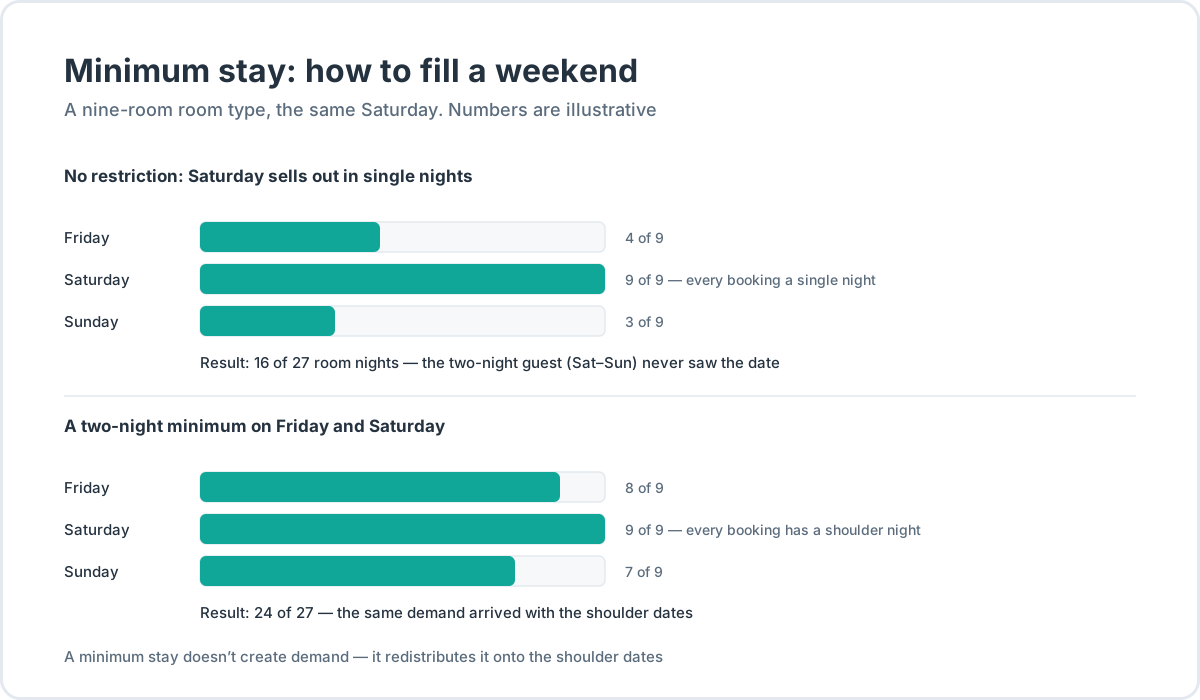
How this works on a weekend. Saturday is always full, and the shoulder dates — Friday and Sunday — stand half-empty. A two-night minimum on Friday and Saturday tells the guest: Saturday sells only together with the neighboring night. Whoever needs Saturday specifically will take Friday–Saturday or Saturday–Sunday — and the shoulder dates fill with the very same demand.
A real case. A twenty-room hotel in a wine region introduced a two-night minimum on the Saturdays of its peak period (a HospitalityNet analysis, July 2025). The season’s outcome: weekend occupancy evened out, the average rate grew on “linked” bookings, revenue came in above the previous year — and the load on the housekeepers fell. The authors of the analysis, revenue-management practitioners, call restrictions one of the most undervalued revenue levers an independent hotel has.
The number of nights doesn’t come out of thin air. You read your own history: the average length of stay on those dates last year, the share of one- and two-night bookings, the pace of bookings for the dates ahead. If Saturdays already sell as two-night stays, the restriction isn’t needed. Occupancy and pace for future dates are visible right in the Planner — no glancing at market averages.
Weekends are not the only scenario. The second is the seam between seasons: Cornell’s revenue-management teaching materials note that a minimum stay pays off best precisely where a string of busy nights gives way to empty ones. A restriction on the last peak dates “pulls” the stay into the start of the low season: the guest who came for a fair or a festival stays a day or two after it, and the tail of the peak doesn’t cave in.
A separate word on perception: a restriction can be framed as an offer instead of a ban. “Three nights for the price of two” on the same peak dates is the same minimum stay — only the guest sees not a wall of “no single nights” but a reward for length. The night still sells inside the same long booking, without the frustration in search.
A blanket minimum is a mistake, and here is why. Short trips are the majority of demand: according to Eurostat data for 2024, 56% of the roughly 1.2 billion trips by EU residents last one to three nights. The European Travel Commission (2025) sees the same picture in travel plans: 38% of trips are planned for 4–6 nights, 37% for 7–12; in Q2 2025 arrivals grew by 3.3% while nights fell by 0.7% — the flow grows while the average trip gets shorter. A three-night minimum across the whole calendar cuts off the one- and two-night bookings. A restriction is a surgical tool for specific dates, not a net thrown over a season.
The Saturday-to-Saturday pattern. Seasonal properties often want to rent the week strictly Saturday to Saturday. A seven-night minimum doesn’t deliver that: a guest can still arrive on a Tuesday. The solution is the pair “No check-in” + “No check-out” on every day except Saturday: a stay can start and end on Saturday only, and the minimum length picks up the rest.
The guest leaves early. A minimum stay holds the booking at purchase, not physically. If the guest checks out a day early, the cancellation policy does the work: the penalty terms are fixed at booking and land in the guest’s booking voucher — the document you will lean on in a dispute.
How a closure reaches the channels
If the channels are connected through a Channel Manager, a closure doesn’t need repeating by hand in every dashboard. The mechanics are these.
Close a date’s sales — and the quotas on that date zero out in every channel. One edit in your own system; zero everywhere.
A date in a channel zeroes out for two different reasons, and they are worth telling apart. The first: you closed the sales — the zero was sent out by sync and holds until you open the date back up. The second: everything sold — the quotas are computed from a single calendar, and when the last room of a room type on a date goes, the zero travels to the channels on its own, through the same sync. The practical point: if a channel shows “no rooms” on a date you never closed, that is not a failure — that is a sellout.
Restrictions go out to the channels in one package with prices and availability: minimum and maximum stay, the check-in and check-out bans, closed dates. At Airbnb the minimum stay maps to the trip-length settings — including per check-in day; at Booking.com, to a rate’s restrictions on dates.
Delivery is not instant, and your software can’t change that. Booking.com processes changes between the Extranet and a sync system for up to five minutes; a full calendar sync takes up to two hours. While an edit is in flight, the window stands open: if two guests in different channels book the last room of the same date, both bookings can go through — the conflicting one goes into manual review.
Two rules follow. First: don’t edit dates in a channel’s dashboard if you work through sync — the edits conflict, and the channel itself warns about it. Second: after closing an important date, look into the delivery log — did it arrive, with what status. How the whole sync machinery is built and what to ask when choosing a system — in the article on the Channel Manager.
And once more, short: a stop-sell set by hand in a channel’s dashboard lives on the channel’s side — it never sees your zero. If you close, close in your own system.
The economics of restrictions: what each level costs
Each of the three mechanisms has a price. Worth knowing it in advance.
Closed the date — didn’t sell the night. A flat ban costs exactly what that night would have brought in. When the date belongs to the hotel — repairs, a group — that is not a loss but a plan. When a date was closed “just in case,” it is simply an unsold night. An open calendar is also a condition of visibility: Booking.com’s guidance advises filling the calendar up to two years ahead, so the property stays in the results while travelers search and book.
Opened everything to everyone — sold the peak off in singles. The opposite error: the peak Saturday goes to one-night bookings, the shoulder dates stand empty, and the guest ready to stay two nights sees “no dates” and walks to the neighbor. That is cannibalization: a short booking eats nights that could have sold long.
A restriction is a filter on the results. Booking.com puts it bluntly: the more restrictions, the fewer potential guests will see the property — and if a traveler’s dates don’t fit your conditions, you may not show up for them at all. A three-night minimum hides the property from anyone searching for one or two nights. How the results are assembled and what sits in them besides availability — in the analysis of OTA ranking algorithms.
Before introducing a restriction, revenue-management practitioners suggest a three-question test (Revfine, February 2025):
- Does demand exceed supply — are you expecting practically full occupancy?
- Is there multi-night demand around this event?
- Have you tried simply raising the price?
Any “no” — the restriction is premature. The safety rule is short: when in doubt, don’t restrict.
Alternatives to a hard ban. A single-night surcharge, on the order of 20% by the same practitioners: the guest can buy one night but pays for the fragmentation. “No check-in” on the peak day is the soft version of a minimum: arrival dates shift to the eve, and the peak ties itself to the shoulder dates. Partial closure — by channels or by room types: you stay visible where demand is still useful to you.
The same practitioners name three typical mistakes. “Set and forgotten”: a minimum introduced for a holiday weekend in May lives in the calendar until November and quietly trims autumn demand — restrictions are reviewed together with prices, by season. A restriction without a forecast: a property-wide minimum “just in case,” while booking pace hasn’t yet confirmed the peak will happen at all — friendly fire. Removal at the last moment: hold the minimum to the final week and lift it then, and the single nights no longer sell — the booking window has compressed, and demand for such dates made up its mind long ago.
Gap nights. A hard minimum doesn’t monetize the single night squeezed between two confirmed bookings: a stay can neither start nor end “through” it. The practice is to ease the minimum as the date approaches: drop a night a week or two out, sell what is left in the final days. Since 2026 Booking.com has automated this pattern on its own side — “dynamic restriction rules” for unsold and gap nights; that is channel machinery, but the direction of the market is plain. And the last move: instead of cutting the base rate, set up a separate long-stay rate with its own price. How to build that ladder — in the article on pricing your rooms.
How this is built in HotelsCalendar
Everything above lives in one place in the PMS — and that is the point: restrictions sit in the same system as the prices and the calendar, inside rates, not in per-date cells.
Rates. A restriction is set on a rate and inherited by its child rates — ten toggles: min/max stay, min/max stay on arrival, “Closure,” “No check-in,” “No check-out,” min/max days until check-in, “OTA limit.” A non-refundable or channel rate isn’t configured from scratch — it takes its parent’s rules.
Price Manager. The “Calendar” tab: click a date’s cell and an editor opens — “Sales closed,” “Closed to OTA,” “No check-in,” “No check-out” buttons, min/max fields. The “Bulk update” tab: period, room types, weekdays and a separate “Restrictions” section — a seasonal grid of minimums goes in as one operation, with a preview before it applies.
Channels. Restrictions are exported to the channels together with prices and availability, two years ahead. Closed the sales — the quotas zeroed out in every channel. Every export is visible in the log: the channel, the period, the status.
Planner. A single room blocked for repairs — a click on the cell, dragged like a booking, with the reason “Repair.” Once more: a room block is not a closed sale. One room goes into repair — a nine-room room type keeps selling its eight.
If a booking is created by hand on top of a restriction — checking your own guest into a “No check-in” date, or below the minimum — the system won’t forbid it but will ask for confirmation: the “Confirm override” checkbox. Restrictions are about sales, not about making it impossible to check in a guest you have known for ten years.
Honest about the limits. There is no price heatmap — there is the “Calendar” tab. There are no ready-made length-of-stay reports — occupancy and booking pace are read from the Planner. There are no automatic rules that ease the minimum on their own as the calendar empties — that is RMS (revenue management system) territory, a separate class of systems adopted later, and not by everyone. What sync with logs and channel statuses looks like — on the Channel Manager page.
How the wedding from the first paragraph plays out. “No OTA” goes on for Friday and Saturday: the channels get zero, while the direct channel and the phone keep working. Bookings for the wedding guests are created by hand, as the confirmations arrive, at the agreed price. When the invoice is settled and the confirmed bookings stand in the Planner, the date can be opened back up — or left closed, if the rooms are going to the wedding whole. Not a single edit in the channels’ dashboards, one source of truth — and no Airbnb surprises on Friday morning.
The takeaway
- A stop-sell closes sales on one channel, in that channel’s dashboard. It lives on the channel’s side and can override sync. An emergency tool.
- A closed date is “Sales closed” (zero everywhere) or “No OTA” (channels closed, direct sales live). Acts on new bookings only.
- Restrictions keep the date open on conditions: min/max stay, check-in and check-out bans, the booking window. A surgical tool for peak dates.
- Close in your own system, not in the channels’ dashboards — sync spreads the closure across the channels and zeroes the quotas.
- A restriction is a filter: run the three-question test first; when in doubt, don’t restrict.
Frequently asked questions
How is a stop-sell different from closing sales in your own system?
A stop-sell is set in the channel’s dashboard and closes sales on that channel only; it is stored on the channel’s side and can conflict with the export from your system. A date closed in the PMS closes at once in every channel, through sync, and holds until you lift it. Planned closures live in your own system, and the Channel Manager spreads them across the channels.
What happens to existing bookings when dates are closed?
Nothing: a closure acts on new sales only. Confirmed bookings for a closed date stay in force — the guests arrive as planned. That is why a group’s dates are closed first, and only then do you wait for the payment — not the other way around. What to do if two bookings for one date have already happened — in the article on overbooking.
Does a guest on Booking.com see why a date is closed?
No. The guest sees neither the reason nor the fact of the closure: a closed date simply isn’t shown — it never appears among the available dates. Hence the rule: closures and restrictions hide the property from searches they don’t fit, and before closing a date “just in case,” it is worth counting what it cost in impressions. How the results are assembled — in the analysis of OTA ranking algorithms.
Does the minimum stay transfer to Booking.com and Airbnb?
Yes. Restrictions are exported to the channels in one package with prices and availability — that is the work of the Channel Manager. At Airbnb the minimum stay maps to the trip-length settings — they can be set per check-in day; at Booking.com, to a rate’s restrictions on dates. This doesn’t cancel manual edits in the channels’ dashboards: those conflict with the export.
How many nights should the minimum stay be?
The market’s starting point is two nights on peak dates: Saturdays, events, holidays. The exact number is read from your own history: the average length of stay on those dates last year, the share of one-night bookings, booking pace. A blanket minimum across the whole calendar isn’t needed: short trips are the majority of demand — by Eurostat (2024), 56% of trips last one to three nights. How the restriction works inside a rate ladder — in the article on pricing your rooms.
Should the room type be closed when one room is under repair?
No. One room under repair is a block on that specific room in the Planner, with a reason; the room type keeps selling its remaining rooms. Dates are closed wholesale only when the service is impossible for everyone: no hot water, a floor shut, the whole property on maintenance. Blocks and bookings live in one Planner in the PMS.