Notes for hoteliers
A channel manager: what it is, how it works, and how to choose one

Vitaly Gariev / Pexels
Sunday, eleven at night. The receptionist of a twelve-room hotel is closing the shift and sees the same double room in the Planner for Tuesday—twice. One booking came from Booking.com, the other from Airbnb. Both confirmed, both with a guest’s card on file. One guest will sleep that night; the other gets told in the morning that the room doesn’t exist.
A walk to the hotel around the corner at the property’s expense, a taxi, compensation, apologies to the channel—the evening turned into a post-mortem. And the next morning brought the question that should have been asked earlier: why could two calendars show different things at all.
The answer is dull: because there were two. With one channel, availability lives in one place and there is nowhere to err. From the second channel on, every date carries two versions of how many rooms are free—and those versions get reconciled by hand, in passing, at best in the evening. A channel manager is the software layer that takes over exactly this job: rates, availability, and selling rules identical across every channel, and bookings that sold flowing back into the property’s calendar on their own. What follows is what exactly it syncs, what manual mode really costs, how the synchronization works, and the criteria for choosing one.
A channel manager in plain words
The definition fits in two sentences, and every industry source agrees on it. A channel manager is the intermediate layer between a property management system and the sales channels: outward, it sends what you sell—rates, availability, conditions; back, it brings what got sold—bookings, their changes, and cancellations. Everything else in this article follows from those two sentences.
Boundaries first, because they get confused most. A channel manager doesn’t sell and doesn’t advertise. The listing, the photos, replies to reviews, paid visibility programs—all of that stays in the channel’s dashboard. This software won’t lift your position in search results either: it synchronizes data, and accurate data is only one of the conditions of being shown. How ranking at Booking.com and Airbnb is actually built—in a separate deep dive.
Its place in the stack is the layer between the core and the storefronts. A PMS (property management system) runs the property: the Planner, rates, guests, money. Channels are storefronts where the property is present as a listing and sells its dates. A channel manager can be a standalone program or a module inside the PMS—for an independent property with 9–30 rooms the second is the typical shape: one calendar, one vendor, no extra seam where data gets lost.
And this is not an exotic purchase; it is the market’s default. Per an industry report covering 90+ million bookings at independent properties in 2025, 63.4% of those bookings arrived through channels—61% a year earlier. Channels are the bulk of demand; the question isn’t whether you need them but who keeps their data in order. What an OTA (online travel agency) is and what goes into a channel’s commission—in a separate article.
What exactly gets synchronized
Outward, from the PMS to the channels, go three streams.
Availability—how many rooms of a room type can be sold on a date in this channel. Rates—prices by date and rate plan. Restrictions—the rules for selling a date: minimum and maximum stay, arrival and departure closures on individual dates, a full stop on sales. Together, these three streams are what “accurate data” means: a channel holding a fresh price and yesterday’s availability is selling yesterday’s hotel.
Back, from the channels into the PMS, comes what has already sold: new bookings, changes to them, cancellations. A cancellation is a sync event too: the date it freed has to go back on sale in every channel, or the room simply sits empty.
The principle the whole thing stands on: quotas for a date are computed from the PMS’s single calendar, not kept as a separate counter per channel. The last room of a room type sells—every channel now shows zero for that date. You stop sales on a date—the quotas zero out everywhere. You raise Friday’s price—the new rate travels to every channel that sells this rate plan. One source of truth, many storefronts.
A property’s own events are a separate and underrated case. A family wedding, a corporate group, a room type going into renovation: those dates are for you, not for guests. Closing a date for sale stops it completely—and the channels receive zero availability for it through the same sync, without a tour of dashboards. Existing bookings don’t go anywhere: the closure acts only on new sales.
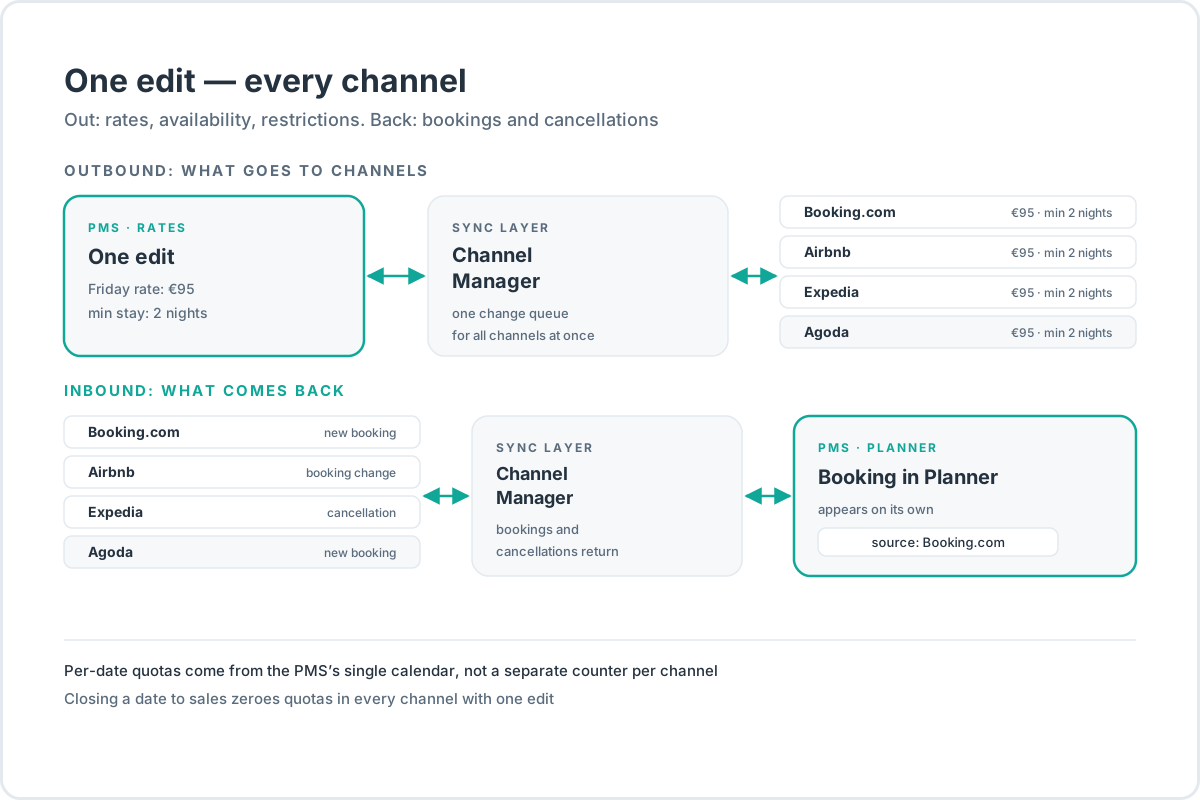
The return flow shows up best in the Planner: a booking from a channel appears there on its own, tagged with where it came from. The Planner holds bookings; prices live in rates—and as long as those two worlds stay separate, an accidental price edit won’t “travel” to the channels by itself. How to build the rates and restrictions that will travel—in the article on pricing your rooms.
What happens without one: the price of manual transfer
Manual mode looks like this: every channel has its own dashboard and its own calendar. A booking arrives—you go into the remaining dashboards and close the date. A price changes—you repeat the edit everywhere. A booking cancels—you open the date back up. Each operation is trivial. The problem is their count, and the pauses between them.
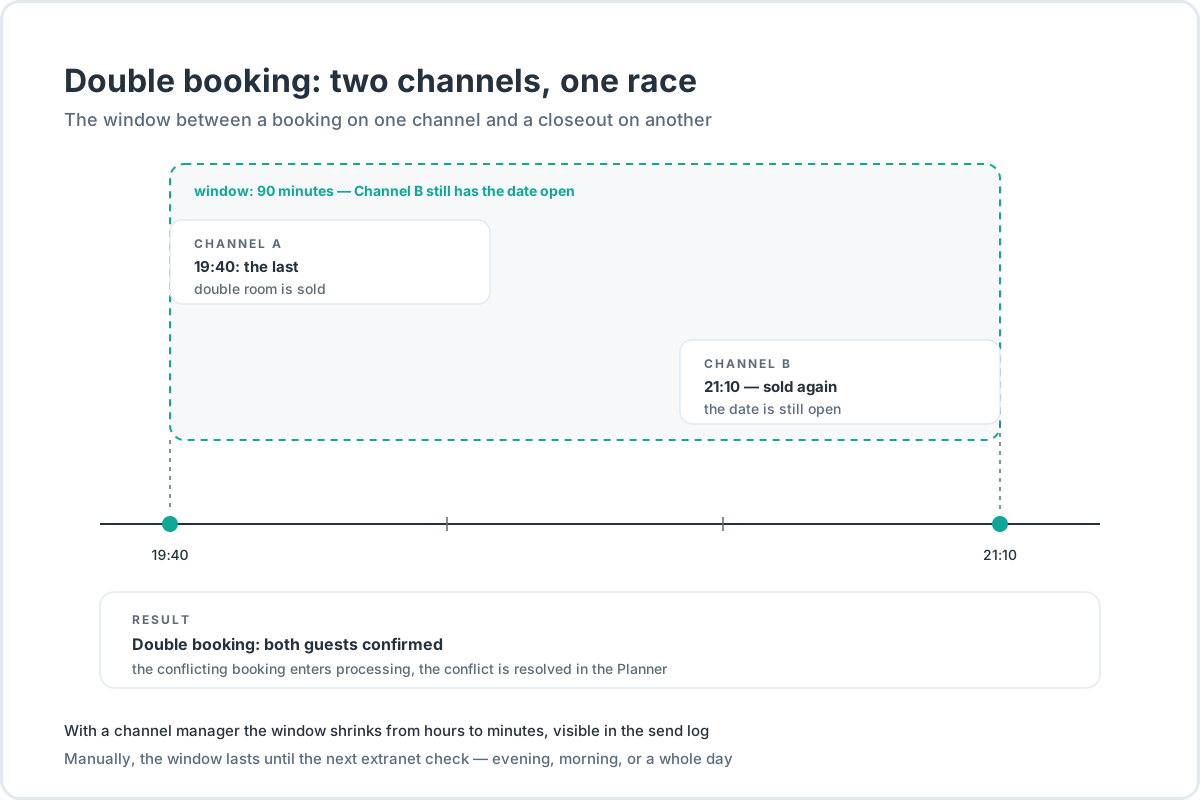
Estimates of time spent on manual sync wander across vendor blogs: surveys of owners land near ten hours a week across five channels. Those are surveys of practice, not measurements—statistics they are not, so we won’t lean on them. The mechanics of the error need no statistics: between the booking on channel A and the closing of the date on channel B, time passes—and inside that window a second guest sees a free room. That is where a double booking is born. It is not the same thing as strategic overbooking, the deliberate selling past capacity against expected no-shows: what we are talking about is an unplanned sync failure.
What it costs. By industry review estimates, $200–500+ in direct expenses per incident: walking the guest to another hotel at the property’s expense, transport, compensation to the guest. Cornell’s teaching example counts it this way: a walked guest costs about $300, an empty room about $100; the industry norm for compensation is a night’s stay plus the ride. Plus what money doesn’t count: the negative review, the staff hours, the damaged relationship with a channel.
Now the arithmetic against the subscription. One double-booking incident is the same $200–500 in direct costs. A standalone channel manager for a property of up to 50 rooms runs $50–200 a month (vendor reviews, 2026). One prevented incident pays for one to ten months of the system—before the conversation ever gets to the review that can’t be deleted.
Cancellations make manual mode worse. Per the same report, 21.8% of channel bookings cancel, against 10.6% of direct ones. A canceled booking puts the date back on sale—often at the last moment—and you have to get it reopened in every dashboard. Manual sync errs in both directions: it sells what’s taken and hides what’s free.
There is a background economy worth remembering, too. A channel’s commission averages 15–30%+ of the full booking amount (industry report estimate), while a booking from the hotel’s own site is worth $516 on average against $312 from a channel (industry report, 135 million bookings across 20 markets; the source itself sells channel managers, so it is more honest to read those as an order of magnitude). Channels bring volume; the direct channel brings margin and guest data. A channel manager doesn’t settle that balance for you—it takes over the routine the balance never has time for. How to build the direct channel—in the Booking Engine guide.
How the synchronization works
Two-way sync is two streams over one connection to each channel. Outward, rates, availability, and restrictions go automatically—no signing in to channel dashboards. Back, into the shared PMS calendar, come bookings, changes, and cancellations.
What it looks like in the minute of a sale. A guest books the last room of a room type for Friday on Booking.com. The booking lands in the PMS, the room type’s availability for that date drops—and Expedia and Agoda see zero for Friday, by the same mechanism as any other edit. A cancellation mirrors it: the date is back on sale, and the channels see the room again. The time between the booking and the update everywhere else is that delivery time we come to below.
The connection itself is not a garage-built affair but a formalized industry practice. Large channels run formal connection programs. Booking.com certifies the partners through which properties run their sync—in the platform’s help center they are called connectivity providers. A connectivity provider is the intermediary through whom a property manages its calendar, rates, and restrictions; the typical case is a channel manager. The requirements for partners are in writing: support every API function, push rates and availability at least a year ahead, keep up with API changes. Airbnb maintains a public list of supported channel managers.
Connections differ, though, and the word “synchronization” doesn’t tell you which kind you are getting. The slow kind exchanges calendars on a schedule: simple, cheap, but updates arrive with a delay and bookings arrive by email. A proper two-way connection keeps one line to the channel for everything: a booking returns to the system on its own, restrictions travel together with the rates. Telling them apart when choosing is easy—ask what exactly goes out to the channel and what comes back, and ask to see the delivery log.
Through the OTAs’ eyes
The most telling part: channels don’t merely tolerate synchronization—they encourage it. Booking.com’s help page on syncing the Extranet and a channel manager states the purpose plainly: sync exists “to prevent double-bookings.” The same page carries the official advice: if you work through a connectivity provider, manage your calendar and rates through the provider, not through the Extranet—then changes are guaranteed to be saved. Airbnb’s official page on channel managers lists the benefits: fewer mismatches in prices and open dates, more trust from guests and agents, more bookings thanks to accurate data.
The platforms’ logic is simple. When the data agrees, a property opens its whole inventory more boldly—with no double bookings to dread, there is no need to hide half the rooms just in case. The guest sees honest availability, the platform sells, the property receives bookings. All three win.
And “hiding half” is not a figure of speech. Properties without sync often hedge: they push not the full inventory but a “safe” part of it to the channels—what if they don’t manage to close a date in time. Inventory hidden in a closet is half-sold weekends. A single calendar doesn’t remove the fear by itself—it makes the fear unnecessary.
Why sync isn’t instant
An honest detail the sales pages stay quiet about: synchronization has a delivery time, and it doesn’t always depend on your software. Booking.com writes it outright: changes between the Extranet and a channel manager “can take up to five minutes to process.” That is the platform’s own time, not a characteristic of whatever system you choose. The practical conclusion: if two guests book the last room in two channels inside one short window, both bookings may go through. The conflicting booking lands in processing—and it is better sorted out in the Planner than on the phone with a guest. Booking.com draws a more everyday consequence from the same rule: edits made at the same time in the Extranet and in the channel manager can diverge—which is exactly why the platform advises choosing one source of truth.
That is why the honest formula reads not “zero double bookings” but “a conflict becomes a one-off incident instead of a daily lottery.” The window shrinks from hours to minutes, every send is visible in the log, and the status of every connection—active, paused, error—is a line on a screen, not a guess.
Why sync breaks: five recurring causes
Even automated synchronization fails sometimes. Industry post-mortems converge on five repeating scenarios.
- Scheduled updates instead of event-driven ones. The system polls the channels once an hour—between polls, the channels show stale availability.
- A room type mapping error. The classic after renaming rooms or changing capacity: the channel receives data for the wrong room type.
- Manual edits in the channel dashboard. A price touched outside the system conflicts with what the system sends next time.
- A one-way flow. Prices went out, but bookings come back by email: half the sync exists, half of it doesn’t.
- A delay on the channel’s side. The platform itself processes the change longer than usual; nothing a property can do here—what matters is how fast it sees that happening.
The consequences are the same: walked guests, staff hours, reviews. And one more that gets forgotten: sync failures hit the listing’s ranking—a channel demotes a property that shows inaccurate data. How ranking is calculated—in the article on OTA ranking algorithms.
Practice, from the same post-mortems. Don’t edit prices in the channel dashboard if you are running a system—the third cause on the list is the most predictable of them all. After renaming room types, check the mapping. And whenever a channel behaves strangely, read the delivery log first and write support second: half of all “failures” are solved by a resend, not by waiting.
Which gives you the main question for any system you are choosing: “What will I see when sync breaks?” If the answer is “you’ll write support,” that is a bad answer. A good system shows a delivery log—which channel, which period, which status—shows the statuses of connections, and has a button that forces a sync of all channels in one action.
How to choose a channel manager: five criteria
Search results for “how to choose a channel manager” are top-10 ratings where every line is for sale. One such list can’t be beaten with another list of names, so—criteria. They are the same for any vendor, including us.
-
Channel coverage. Not the number from the landing page but the presence of your channels: a catalog with search by name, where Booking.com, Airbnb, and Expedia come up in seconds. The biggest players count connections in the hundreds—large vendors claim 450+—but you need your own three to five, not someone else’s total. Before buying, open the catalog and find your channel in it: one minute that separates real coverage from a number on a banner.
-
The link to the PMS. Quotas must be computed from a single calendar, not duplicated as a counter per channel—otherwise double bookings come back from inside the system. If the channel manager is standalone, ask how it connects to your PMS and who is responsible for the seam.
-
Visibility of state. Connection statuses, a delivery log with periods and statuses, a manual sync in one action. At the demo, ask to see the error screen, not the happy path. A good sign: the vendor shows it unprompted.
-
Maintenance of integrations. Channel APIs change constantly—that is an official requirement of the connection programs, not a seller’s scare story. Ask who catches up with a given channel’s changes, and how fast. “We have direct relationships with the channels,” without specifics, is not an answer.
-
The pricing model. Market benchmarks of 2026 from vendor reviews: a standalone channel manager for a property of up to 50 rooms is $50–200 a month; a bundle of PMS + channel manager + booking engine is $250–500. The commission model—about 2% of bookings—works out more expensive than a fixed subscription on growing revenue. Run it against your own revenue, not against the average.
| Pricing model | How you pay | When it costs more |
|---|---|---|
| Fixed subscription | once a month, regardless of bookings | almost never—the easiest to budget |
| Per room | in proportion to the property’s size | in peak season, when sales are heavy |
| Per booking or a percentage | on every booking through the system | on growing revenue—the cost scales with your success |
The second fork: take the channel manager as a module inside the PMS or as a standalone program. For an independent property the typical answer is a module: one vendor, one calendar, fewer seams. A standalone manager earns its keep when you need a channel your PMS doesn’t have, or when distribution matters more to you than the operational core. And a CRS—a central reservation system for chains—is something a small property doesn’t need at all: that is management-company territory; its functions are covered by a PMS and a channel manager.
When you don’t need a channel manager yet
The honest answer: while you have one channel, you don’t. One dashboard, one calendar, bookings moved across by hand. But that mode has a price of its own—discipline: close the date after every booking, open it after every cancellation, never skip. Manual mode is free exactly until the first skip. An illness, a vacation, a hectic check-in day—and the window for a double booking has opened itself.
The boundaries are plain. One channel—a dashboard and attentiveness are enough. Two or three channels with manual transfer—it is already time: too many edits, and all of them urgent. Not because people are bad, but because manual sync doesn’t scale.
If you are still assembling a property’s whole system, start with the article on software for a small hotel: it places the channel manager in the sequence “inventory → rates → channels → website,” and that sequence matters more than the shopping list.
And one more honesty. A channel manager doesn’t pay for itself in “saved hours”—the argument is real but limp. The strong one is the arithmetic from the section on the price of an error: one prevented incident pays for months of subscription, and a prevented review can’t be paid for at all.
How it’s built in HotelsCalendar
Briefly, how the criteria above look with us.
Connection: a catalog of more than 100 channels with search by name, the channel property ID from the channel’s dashboard, then mapping room types and rates. Once mapped, availability, rates, and restrictions upload to the channel automatically—two years ahead. Restrictions travel in one package with prices and availability: minimum and maximum stay, arrival and departure closures, zero quotas on closed dates. Quotas are computed from the single PMS calendar: closing a date for sale zeroes the quotas in every channel with one edit, not with a tour of dashboards.
Transparency. Every channel has a status: active, paused, error. The delivery log shows the channel, the period, and the status of every upload. A sync of all channels can be forced with one action. New bookings land in the Planner on their own, with the channel’s name. And bookings sold before the connection are imported by hand for a period—history won’t pull itself in, and we prefer to say so up front rather than after you’ve connected.
To see it working—the Channel Manager page.
The bottom line
- A channel manager is the layer between a PMS and the channels: rates, availability, and restrictions go out; bookings, changes, and cancellations come back.
- Manual mode errs in both directions: it sells what’s taken and hides what’s free; a double booking is its most expensive mistake—$200–500+ and a review.
- Sync isn’t absolute: channel races are rare but possible—a conflicting booking lands in processing and gets sorted in the Planner.
- The channels themselves encourage sync: Booking.com advises managing the calendar and rates through a connectivity provider.
- Choose by the catalog, the link to the PMS, the delivery log, the maintenance of integrations, and the pricing model. While you have one channel, hands are enough.
Frequently asked questions
What is a channel manager in plain words?
It is the link between a property management system and the sales channels. You change a rate or availability once—the change goes out to every connected channel; a guest books in a channel—the booking lands back in the property’s calendar. The data is run by the PMS; the channel manager synchronizes it.
How is a channel manager different from a PMS?
The PMS runs the property: the Planner, rates, guests, the cash desk. The channel manager only synchronizes prices, availability, and bookings between the PMS and the channels. You don’t have to buy them separately: a channel manager can be a module inside the PMS—at HotelsCalendar it comes in one subscription together with the other modules.
Do I need a channel manager if I have one channel?
No. One channel—one dashboard, edits by hand. The line is drawn at the second channel: from that moment availability lives in two places, and every new booking opens a window for a double booking. How a channel manager fits into a property’s whole set of systems—in the article on software for a small hotel.
Why do double bookings still happen with a channel manager?
Channels race one another for the same room, and sync has a delivery time. If two bookings go through inside one short window, both can end up in the system—then the conflicting booking lands in processing, and the conflict gets sorted in the Planner. The difference isn’t “zero errors”; it’s that a conflict becomes a one-off incident instead of a daily lottery. How it works in the product.
What is mapping room types and rates?
The channel-connection step: your room types and rates get paired with the channel’s room types and rates, so the data lands in the right listings. Mapping errors are one of the recurring causes of sync failures, especially after renaming room types. Mapping is checked on the Channel Manager screen.
Does a channel manager replace the channels’ dashboards?
No. The listing, photos, replies to reviews, visibility programs—all of that stays in the channel’s dashboard; the software doesn’t upload photos. A channel manager is responsible only for the data: rates, availability, restrictions, and bookings. What channels give a property and what that costs—in the article on OTAs.