

Channel Manager
This content is not available in your language yet.
| Why | Sell through channels — Booking.com, Airbnb, Expedia, and dozens more — without re-entering prices and availability in every channel account by hand. |
| Who | Administrators and hotel owners who set up sales channels. |
| What you’ll get | The channel is connected: prices and availability flow out on their own, and bookings arrive in the calendar grid automatically. |
| Limitations | Numbers in the screenshots are demo data. Bookings made before the connection do not arrive by themselves — they are imported manually for a period (see “Honest limits”). |
Channel Manager is the distribution module of HotelsCalendar PMS: it connects the calendar grid to external sales channels. You connect a channel and map categories and rates once — from then on everything runs on its own: changes flow out to channels without a “send” button, and channel bookings appear in the calendar grid with a notification.
The channel catalog
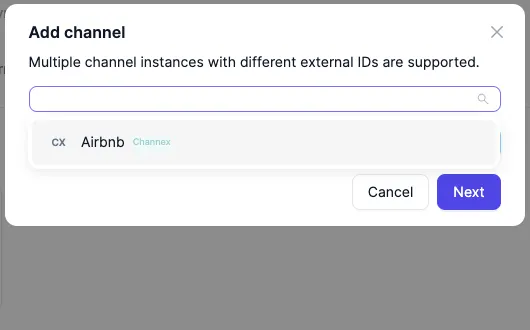
Section titled “The channel catalog”Connecting starts on the Channel Manager page. The Add channel button opens the catalog: more than 100 channels, from Booking.com and Airbnb to dozens of regional ones. Searching by name is the easy way in: start typing and the list narrows until the channel you need is the only one left.
Connecting
Section titled “Connecting”- Open Channel Manager in the left menu.
- Click Add channel and find the channel by name through search.
- Enter the property ID issued by the channel’s own account; HotelsCalendar uses this identifier to find your property on the channel’s side.
- For some channels it is enough to sign in to your channel account: connecting takes a single click, with no technical setup.
Outcome: the connection is created — the channel card appears on the Channel Manager page.
One channel can be connected several times, each instance with its own external ID; the Add channel dialog points this out up front.
Mapping
Section titled “Mapping”After connecting, the channel knows about your property but not yet which of its categories corresponds to a category in the PMS. Mapping settles this: the channel’s and the PMS’s categories and rates are paired on one screen.
- Open the “Category and rate mapping” dialog from the channel’s card.
- On the “Categories and occupancy” tab, pick a PMS category for every channel category.
- On the “Rates” tab, pair the rates: each channel rate gets the PMS rate whose price it sells at.
- Save the mapping.
Outcome: every channel category and rate has a counterpart in the PMS — the channel knows what it sells and at which prices.
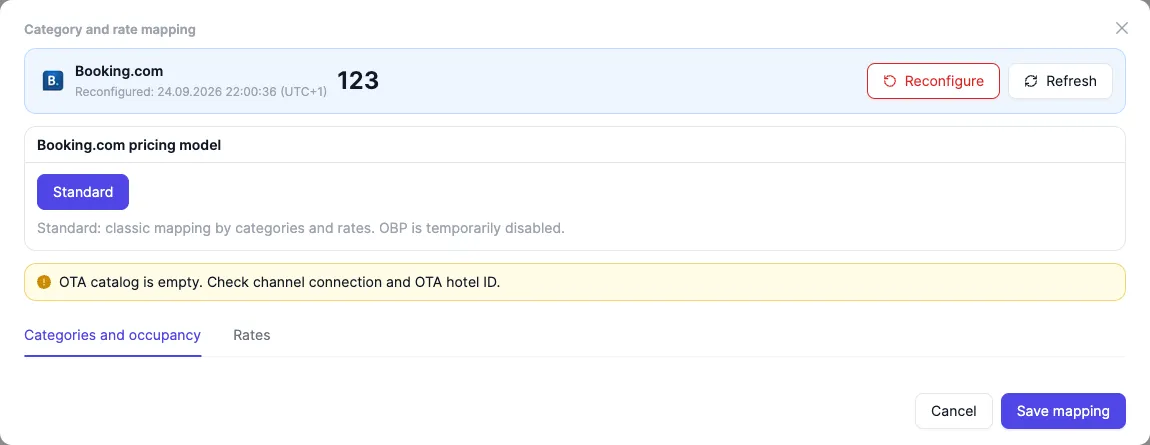
The screenshot shows the mapping window: the “Categories and occupancy” and “Rates” tabs, the last reconfiguration date, and the property ID in the channel. If a warning appears instead of the category list — “The OTA catalog is empty. Check the channel connection and the property ID.” — the channel has not handed over its catalog yet: check the ID and the connection. Once the catalog is loaded, the channel’s categories with their IDs sit on the left, with a “PMS category” dropdown next to each.
After connecting
Section titled “After connecting”Right after the mapping is saved, HotelsCalendar pushes prices and availability to the channel for two years ahead; some channels have a shorter horizon — the channel accepts as far ahead as it is built for.
From then on there is nothing to send. Every change to prices, availability, or selling restrictions made in the PMS flows out to channels automatically — there is no separate “send” button; restrictions (min/max stay, closed to arrival and departure) go to the channel together with prices and availability. When a one-off refresh of every channel is needed, there is a manual sync in a single action.
Bookings from channels arrive on their own: a new booking appears in the calendar grid and a notification pops up. The source is visible on the booking itself — the channel’s name and logo.
Each connection carries its own status: active, paused, or error. Every push is recorded in the outgoing log: channel, period, and status.
Closing sales zeroes the quotas in all channels — the date goes off sale everywhere at once.
Honest limits
Section titled “Honest limits”- Bookings made before connecting do not come by themselves. A channel hands over only new bookings; everything sold before the connection is imported manually for the period you need.
- Double bookings are possible. If a channel sells the room at the very moment the booking is placed in the PMS, such a pair goes to handling — the double-booking conflict is resolved in the calendar grid.
- Delivery speed depends on the channel. Changes flow out automatically, but how quickly the channel applies them on its side is up to the channel; there are no fixed timeframes.
See also
Section titled “See also”- Bookings from channels: what arrives in the calendar — the path of a channel booking: arrival in the calendar, the source, the channel’s data.
- Mapping: match channel categories and rates — pairing the channel’s categories and rates with yours.
- Delivery log: verify what was sent to channels — delivery diagnostics: events, statuses, errors.
- Double bookings: prevent and resolve — why double bookings are possible and how the system lowers the risk.
- Sales channels: FAQ — short answers to common questions about connecting, synchronization, and bookings from channels.