

Booking Engine
This content is not available in your language yet.
| Why | Sell rooms on your own website, not only through channels: the guest picks a room and pays on their own. |
| Who | Hotel owners and administrators who run the website; no programmer needed. |
| What you’ll get | The booking module runs on the hotel website: it embeds with two lines of code, styles to match your site, and every booking lands in the calendar grid right away. |
| Limitations | Screenshots are taken from the demo property, the numbers are demo data. The embed code is copied from the PMS — no code fragments are shown in this article. |
Booking Engine is the booking module that turns a hotel website into a direct sales channel. The guest searches dates, picks a room, and pays without leaving your site; prices and availability come live from the PMS. Embedding and styling are done from the PMS — no developer involved.
The quick way
Section titled “The quick way”The compact widget is the fastest option. It is a search block that fits any page: the guest picks dates and the party size, then moves on to choosing a room.
- In the PMS, open the Online booking section and go to the “Embed code” page.
- Copy the widget code — two lines: one marks the place on the page, the other loads the widget itself.
- Paste them into the website page where the search block should appear.
Outcome: the date and price search works on your page. The code on your site stays untouched from then on: widget updates arrive from the HotelsCalendar servers on their own.
The full module
Section titled “The full module”The full module is the option for when the whole flow should live on the website: from search to payment. It is an iframe snippet with the guest’s entire journey: room cards, rate selection, payment. The module’s height adjusts automatically: the page neither crops it nor leaves empty gaps while scrolling.
Website builders work too: in Tilda the module expands fully inside its container — the auto height keeps an inner scrollbar from appearing.
Outcome: search, room choice, and payment all happen on your website.
The services showcase
Section titled “The services showcase”Services that do not need a room — spa, tours, transfers — are sold by a separate block: the services showcase. The guest picks a date, puts services into a cart, and pays — no stay required. The showcase is embedded the same way, with code from the PMS, so it can live on the spa page or a dedicated services page.
Outcome: services without accommodation are sold on the website as a separate block with its own cart and payment.
Setting the look
Section titled “Setting the look”The module’s look is tuned to your website from the PMS, without a developer. The base is ready-made themes: six designs for different kinds of properties. On top of a theme, colors and fonts change — down to individual elements — and your logo takes its place in the module header (JPEG, PNG, or WebP up to 2 MB).
Every edit shows up in a live preview: changes apply without a reload, and the preview can be narrowed to a mobile width to see how the module looks on a phone. Changing a theme or a palette takes minutes — there is no need to go back to the website code.
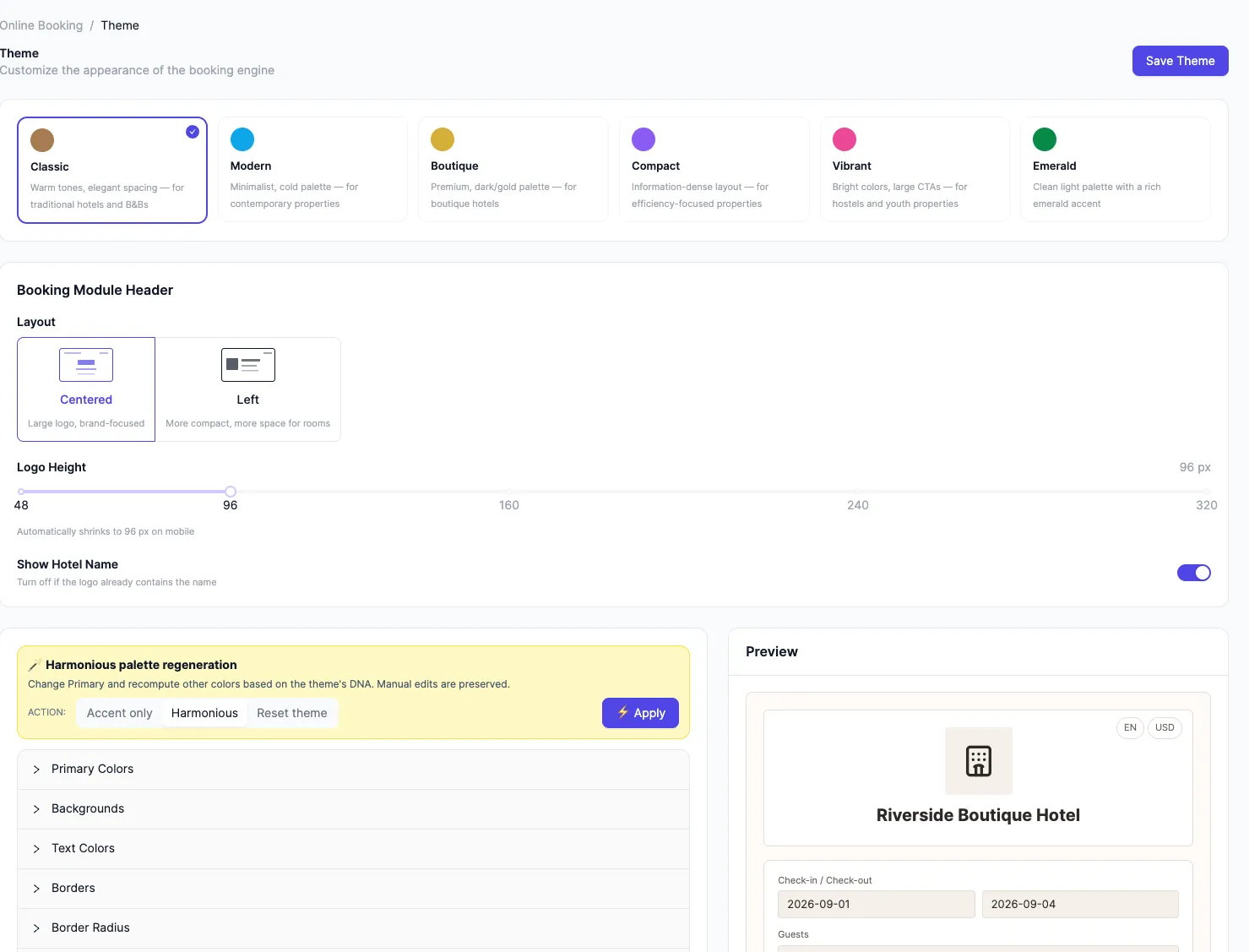
Outcome: the module looks like part of your site, not a third-party block.
Module links
Section titled “Module links”A link to the module can be prepared in advance: parameters added to the page address bring the guest straight to the right state.
- Arrival date — the module opens with the date already set. Handy for a newsletter or a post about specific dates.
- Promo code — the guest sees the applied promo code if you have enabled promo codes in the settings.
- Language — the module opens in the chosen language.
Parameters combine: a newsletter link opens the module with the arrival date and the promo code already in place.
Outcome: the guest arrives with fewer steps — part of the choosing is already done.
What the hotel gets
Section titled “What the hotel gets”- Bookings go straight to the calendar grid. A booking made on the website appears in the PMS calendar grid on its own — next to channel bookings; the source is visible on the booking itself. Nothing needs to be retyped from letters or spreadsheets.
- No engine fees. The module adds no fees of its own to the price. Card payments go through the acquiring bank provider — its commission belongs to card processing, not to the engine.
- The guest’s language and currency. Booking pages are translated into eight languages; which of them to show is your decision. Prices can be viewed in several currencies: the conversion is approximate, and the charge is always in the hotel’s currency.
See also
Section titled “See also”- The Planner: how it works — where website bookings land and what happens next.
- Rate plans: how they work — which prices and rules the guest sees in the module.
- Direct bookings: FAQ — short answers to common questions about the module’s cost, embedding, and payment.